
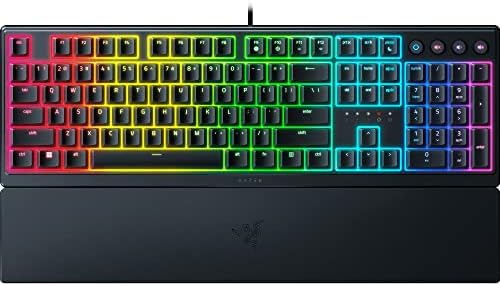
Five slim boards, five different trade-offs: the full-size Razer Ornata V3 pairs a complete key set with a wrist rest, while the TKL version and the 65% ASUS ROG Falchion RX give up keys to save inches. The five boards in this guide all use low-profile keys, yet they differ sharply in layout, switch type, wireless options, RGB control, and footprint. One is a full-size board with a wrist rest and 10-zone RGB lighting, one is a wireless board with a roller and 11 control buttons, one is a tenkeyless version of the first board, one is a full-size board with Cherry MX Low Profile Red switches and per-key RGB, and one is a 65% compact board with tri-mode connectivity and a touch panel.
That spread matters because a low-profile label alone does not tell you how much desk space a board needs, how many keys it keeps, or how it connects. A full-size board at 17.46 inches long needs a different desk than a 10.89-inch tenkeyless board, and a 65% board at 12.05 inches long needs a different setup again. Switches matter in the same way: mecha-membrane, Green mechanical, Cherry MX Low Profile Red, and ROG RX Red optical switches each come with different actuation figures and different key counts around them. Reading the layout, the switch figures, and the connection options together gives a clearer choice than reading any single feature on its own.
As an Amazon Associate, we earn from qualifying purchases.


Pick by Your Need
- Best overall: Razer Ornata V3 full-size. It keeps a full-size layout, adds a magnetic wrist rest, and lists 10-zone RGB lighting with backlit media keys.
- Best wireless: Razer BlackWidow V4 Low Profile HyperSpeed Wireless. It pairs 2.4 GHz wireless with Bluetooth for up to 3 devices and adds a roller with 11 control buttons.
- Best TKL: Razer Ornata V3 TKL. It keeps the same mecha-membrane switches as its full-size sibling in a 10.89-inch body that weighs 0.66 pounds.
- Best per-key RGB: Alienware AW510K. It lists per-key AlienFX RGB with 16.8 million colors, Cherry MX Low Profile Red switches, and a 100 million keystroke life cycle.
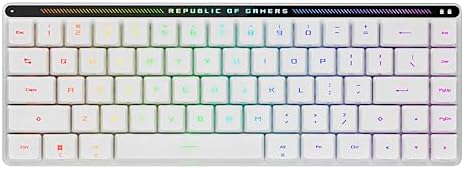
- Best 65% compact: ASUS ROG Falchion RX Low Profile. It fits a 65% layout into a 60% frame, offers tri-mode connectivity, and lists up to 430+ hours of battery life with RGB off.
Quick Answer
Choose the full-size Razer Ornata V3 if you want a complete layout, a wrist rest, and 10-zone RGB lighting in one board. Choose the Razer BlackWidow V4 Low Profile HyperSpeed Wireless if wireless play across several devices matters most, and choose the ASUS ROG Falchion RX Low Profile if you want the smallest footprint here, with a 65% layout, tri-mode connectivity, and a touch panel for media and lighting control.
Comparison Table
| Keyboard | Best for | Layout | Length x Width | Weight | Key data | Buy |
|---|---|---|---|---|---|---|
| Razer Ornata V3 | Full-size setup with wrist rest | Full-size | 17.46 x 5.68 inches | 3.1 pounds | 10-zone RGB lighting, mecha-membrane switches | View on Amazon |
| Razer BlackWidow V4 Low Profile HyperSpeed Wireless | Wireless play across devices | Full-size | 18.12 x 6.32 inches | not stated | 1.2 mm actuation at 45 g, 2.4 GHz and Bluetooth for 3 devices | View on Amazon |
| Razer Ornata V3 TKL | Smaller desk, same switch type | Tenkeyless | 10.89 x 5.68 inches | 0.66 pounds | 8-zone RGB lighting, mecha-membrane switches | View on Amazon |
| Alienware AW510K | Per-key RGB and linear switches | Full-size | 6.1 x 18.4 inches as listed | 0.91 pounds | Cherry MX Low Profile Red switches, per-key AlienFX RGB | View on Amazon |
| ASUS ROG Falchion RX Low Profile | Compact 65% layout | 65% compact | 12.05 x 4.33 inches | not stated | Tri-mode connectivity, up to 430+ hours with RGB off | View on Amazon |
Decision Guide
Start with layout, because layout decides how many keys you keep and how much desk space you give up. The three full-size boards in this guide — the Razer Ornata V3 at 17.46 inches long, the Alienware AW510K at 18.4 inches wide as listed, and the Razer BlackWidow V4 Low Profile HyperSpeed Wireless at 18.12 inches long — keep a number pad and a full key set. The BlackWidow V4 belongs in the same group for desk planning even though its wireless and control features set it apart. If your desk is narrow or your mouse needs room to move, the tenkeyless Razer Ornata V3 TKL at 10.89 inches long and the 65% ASUS ROG Falchion RX Low Profile at 12.05 inches long leave more room beside the board. The trade is direct: the TKL board drops the number pad, and the 65% board drops more keys again to fit a 60% frame.
Next, compare switches by the figures the listings give, not by switch names alone. The BlackWidow V4 lists Green mechanical switches with a 1.2 mm actuation point and 45 g of force, which is the most specific actuation figure in this group. The Alienware AW510K lists Cherry MX Low Profile Red switches with linear switching characteristics, low actuation force, and shorter travel, plus a 100 million keystroke life cycle. The ASUS ROG Falchion RX Low Profile lists pre-lubed ROG RX Low-Profile optical switches, with a choice between RX Red switches for a linear feel and RX Blue switches for a tactile click, plus shorter actuation points and travel distance. The two Ornata boards share mecha-membrane switches, which the listings describe as fusing the clicky feedback of a mechanical switch with the feel of a conventional keyboard. If you want the clearest actuation number, the BlackWidow V4 gives it; if you want a specified linear switch with a stated life cycle, the Alienware board gives that; if you want an optical switch with a choice of Red or Blue, the Falchion RX gives that choice.
Wireless range is the next split. Only two boards in this group list wireless connectivity in their facts. The BlackWidow V4 lists 2.4 GHz wireless plus Bluetooth for up to 3 devices, and it can pair a compatible Razer mouse to the same dongle through multi-device support. The Falchion RX lists tri-mode connectivity: Bluetooth for up to 3 devices, 2.4 GHz RF mode with ROG SpeedNova wireless technology, and a standard wired USB connection, with up to 430+ hours of battery life with RGB off. The other three boards list no wireless mode in their facts, so plan on a wired connection for the Ornata V3, the Ornata V3 TKL, and the Alienware AW510K unless the product page states otherwise. That distinction matters for a shared desk, a living-room setup, or a laptop that moves between rooms.
RGB control also splits the group into zones and per-key control. The full-size Ornata V3 lists 10-zone RGB lighting, while the TKL version lists 8-zone RGB lighting with 16.8 million colors and effects for Chroma-integrated games. The Alienware AW510K lists fully customizable per-key AlienFX RGB with 16.8 million colors through Alienware Command Center, which is the only per-key RGB claim in this group. The Falchion RX lists RGB lighting controlled through its multi-function button and interactive touch panel, without a zone count in its facts. The BlackWidow V4 lists no RGB zone count in its facts, so compare it on its roller, its 11 control buttons, and its switch figures instead of on lighting zones.
Size and weight complete the comparison. The full-size Ornata V3 weighs 3.1 pounds, the heaviest weight stated here, while its TKL sibling weighs 0.66 pounds, the lightest weight stated here. The Alienware AW510K weighs 0.91 pounds and stands 1.2 inches high, and the Falchion RX stands 1.04 inches high, the lowest height stated here. The BlackWidow V4 lists an ultra-low 18.5 mm front height and a 5052 aluminum alloy top case, but its weight is not stated, so do not assume it matches the lighter boards. Height figures also differ: the Ornata V3 is 1.23 inches high, the TKL is 1.22 inches high, and the BlackWidow V4 is 1.37 inches high. Measure your desk depth and your chair height against those numbers before choosing, because a board that is 18.12 inches long and 6.32 inches wide needs a different surface than a board that is 10.89 inches long and 5.68 inches wide.
Media and extra controls are the last practical split. The two Ornata boards list backlit dedicated media keys for pause, play, skip, brightness, and volume. The BlackWidow V4 lists a clickable multi-function roller, dedicated media and connectivity buttons, and 4 specialized macro buttons, for 11 control buttons in total. The Alienware AW510K lists media controls and a USB passthrough in its title, plus fully programmable keys for macros and key assignments stored in on-board memory. The Falchion RX lists a multi-function button and an interactive touch panel for play, pause, volume, and lighting control. If you change volume, skip tracks, or trigger macros during play, count those controls before you count RGB zones.
Use this sequence when you choose: pick the layout first, then the switch figures, then wireless or wired, then RGB control, then footprint and weight. A full-size board suits a fixed desk with room for a number pad. A tenkeyless board suits a desk where mouse space matters but a familiar key row still matters. A 65% board suits a small desk, a portable setup, or a layout where a touch panel replaces some dedicated keys. A wireless board suits a setup that changes devices during the day. A per-key RGB board suits a setup where lighting is set key by key rather than zone by zone.
1. Razer Ornata V3 Full-Size — Best overall
This board pairs a full-size layout with a magnetic wrist rest and 10-zone RGB lighting, a combination no other board in this group repeats in full. Its length of 17.46 inches and width of 5.68 inches give it the third-longest footprint here, behind the 18.4-inch long side of the Alienware AW510K and the 18.12-inch BlackWidow V4, and its weight of 3.1 pounds is the heaviest stated weight in the group. The mecha-membrane switches, UV-coated keycaps, and backlit media keys add up to a board built around a complete key set rather than a reduced one.
| Spec | From the listing |
|---|---|
| Length | 17.46 inches |
| Width | 5.68 inches |
| Height | 1.23 inches |
| Weight | 3.1 pounds |
| Color | Black |
| Size | V3 |
2. Razer BlackWidow V4 Low Profile Wireless — Best wireless low-profile
This board is the only one here that pairs 2.4 GHz wireless with Bluetooth for up to 3 devices and multi-device dongle sharing with a compatible Razer mouse. Its Green mechanical switches list a 1.2 mm actuation point at 45 g of force, the clearest actuation figure in the group, and its 11 control buttons include a clickable roller, dedicated media and connectivity buttons, and 4 macro buttons. At 18.12 x 6.32 inches, it has the widest footprint in this group, and the second-longest, behind the 18.4-inch long side of the Alienware AW510K, so its wireless range comes with a large desk requirement.
| Spec | From the listing |
|---|---|
| Length | 18.12 inches |
| Width | 6.32 inches |
| Height | 1.37 inches |
| Weight | The listing does not state it |
| Color | Black |
| Switch actuation | 1.2 mm at 45 g |
3. Razer Ornata V3 TKL — Best TKL low-profile
This board keeps the same mecha-membrane switches, UV-coated keycaps, backlit media keys, and magnetic wrist rest as its full-size sibling, but in a body that is 10.89 inches long instead of 17.46 inches. That 6.57-inch difference is the largest layout saving in this group, and its weight of 0.66 pounds is the lightest stated weight here, against 3.1 pounds for the full-size version. Its RGB lighting is 8-zone rather than 10-zone, with 16.8 million colors and effects for Chroma-integrated games, and its listing adds spill resistance.
| Spec | From the listing |
|---|---|
| Length | 10.89 inches |
| Width | 5.68 inches |
| Height | 1.22 inches |
| Weight | 0.66 pounds |
| Color | Black |
| Size | V3 TKL |
4. Alienware AW510K Low-Profile RGB — Best per-key RGB
This board is the only one here with per-key RGB lighting, listed as fully customizable per-key AlienFX RGB with 16.8 million colors through Alienware Command Center. Its Cherry MX Low Profile Red switches are paired with full N-key rollover, a 100 million keystroke life cycle, on-board memory, and switches mounted on a metal top plate. The spec table lists length as 6.1 inches and width as 18.4 inches, which reads reversed against the long side of a full-size board, so check those two figures on the product page and measure your desk against the 18.4-inch figure before ordering.
| Spec | From the listing |
|---|---|
| Length | 6.1 inches |
| Width | 18.4 inches |
| Height | 1.2 inches |
| Weight | 0.91 pounds |
| Color | Dark Side of the Moon |
| Switches | Cherry MX Low Profile Red |
5. ASUS ROG Falchion RX Low Profile — Best 65% compact
This board fits a 65% layout into a 60% frame, measuring 12.05 x 4.33 inches and standing 1.04 inches high, the lowest height stated in this group. Its tri-mode connectivity covers Bluetooth for up to 3 devices, 2.4 GHz RF mode with ROG SpeedNova wireless technology, and a wired USB connection, with up to 430+ hours of battery life with RGB off. Pre-lubed ROG RX Low-Profile optical switches, a choice of RX Red or RX Blue switches, two layers of silicone foam, and a touch panel with a multi-function button round out a board built for a small desk.
| Spec | From the listing |
|---|---|
| Length | 12.05 inches |
| Width | 4.33 inches |
| Height | 1.04 inches |
| Weight | The listing does not state it |
| Color | White |
| Layout | 65% compact |
Buying Checklist
- Measure your desk depth and width first, then compare the board length and width: 10.89 inches for the TKL, 12.05 inches for the 65% board, and 17.46 to 18.12 inches for the full-size boards.
- Decide how many keys you need every day, because the TKL board drops the number pad and the 65% board drops more keys again.
- Check the switch figures in the listing, including the 1.2 mm actuation at 45 g on the BlackWidow V4, the Cherry MX Low Profile Red switches on the Alienware board, and the RX Red or RX Blue choice on the Falchion RX.
- Check wireless against wired: only the BlackWidow V4 and the Falchion RX name wireless modes, with Bluetooth for up to 3 devices on each.
- Check RGB control type, from 8-zone and 10-zone lighting on the Ornata boards to per-key lighting on the Alienware board.
- Check the return window on the product page, and compare your final two or three boards side by side on layout, switches, and footprint before choosing.
FAQ
What makes a gaming keyboard low-profile?
A low-profile gaming keyboard uses slimmer keycaps and shorter switches than a standard-height board, which changes hand positioning and reduces the distance each key travels. In this group, the BlackWidow V4 lists an 18.5 mm front height, the Falchion RX lists pre-lubed low-profile optical switches with shorter actuation points and travel distance, and the Ornata boards list slimmer keycaps with shorter switches. Check height, switch type, and actuation figures together, because low-profile alone does not fix those numbers.
Should I choose a full-size, TKL, or 65% low-profile keyboard?
Choose full-size if you use a number pad daily and your desk fits a board 17.46 to 18.12 inches long, such as the Ornata V3, the BlackWidow V4, or the Alienware AW510K. Choose the 10.89-inch Ornata V3 TKL if you want more mouse room without giving up the main key rows, and choose the 12.05-inch Falchion RX if you want the smallest footprint here and accept a 65% layout. Measure first, because the length gap between the TKL and the full-size boards is more than 6 inches.
Do I need wireless on a low-profile gaming keyboard?
Wireless matters if your board moves between devices or rooms, or if you want fewer cables on a shared desk. The BlackWidow V4 lists 2.4 GHz wireless with Bluetooth for up to 3 devices, and the Falchion RX lists tri-mode connectivity with Bluetooth for up to 3 devices, 2.4 GHz RF, and wired USB, plus up to 430+ hours with RGB off. The other three boards name no wireless mode in their listing facts, so choose one of those two if wireless is a requirement for your setup.
Final Verdict
The full-size Razer Ornata V3 is the clearest starting point for a fixed desk, because it keeps a complete layout, a magnetic wrist rest, and 10-zone RGB lighting. The Razer BlackWidow V4 Low Profile HyperSpeed Wireless is the pick when wireless range and control buttons matter most, with 2.4 GHz and Bluetooth for up to 3 devices, a 1.2 mm actuation point at 45 g, and 11 control buttons. The Ornata V3 TKL and the ASUS ROG Falchion RX Low Profile are the picks when desk space matters most, at 10.89 inches and 12.05 inches long, while the Alienware AW510K is the pick when per-key RGB and Cherry MX Low Profile Red switches matter most. Measure your desk, pick your layout, then match the switch figures and connection options to how you play each day.
Prime covers fast, free delivery on eligible items. See whether a Prime free trial is available for your account.
Check Prime on Amazon →Related Guides
No internal guides were listed for this post, so no related guide links are included here.







Write Your Review
No reviews yet. Be the first to share your experience!