
If you want full-color text, images, or animation on a Raspberry Pi, pick one of the three 64×32 RGB HUB75 panels; if you want a single-color dot matrix for scrolling text or readouts, pick one of the two MAX7219 modules. That split shapes the wiring, resolution, and panel size.
The three RGB panels each state 2,048 RGB LEDs in a 64×32 layout, with adjustable brightness and HUB75 headers for chaining. GeeekPi and ALMOCN are a different class: each uses the MAX7219 driver, states a 32×8 layout, and comes in one color, red and blue respectively. Neither is a full-color panel, and neither states HUB75 chaining.
As an Amazon Associate, we earn from qualifying purchases.



Pick by Your Need
- Best overall: waveshare 64×32 RGB Panel. It states 2,048 RGB LEDs, a 2.5mm pitch, and a weight of 0.22 pounds.
- Best for beginners: GeeekPi MAX7219 2Pack. Its stated contents include cable, pin headers, jump wires, and Velcro tape.
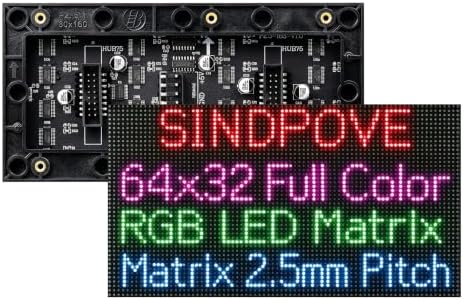
- Best compact RGB: SINDPOVE 64×32 RGB Panel. It states the same 160 x 80 mm size as waveshare at a 2.5mm pitch.
- Best for larger pitch: Wonrabai 64×32 RGB Panel. It states a 3mm pitch, the widest among the three RGB panels here.
- Best multi-pack module: ALMOCN MAX7219 3PCS. It states 3 modules, each on the MAX7219 driver at 5V.
Quick Answer
For color, waveshare and SINDPOVE are the closest matches, with 2,048 RGB LEDs, a 2.5mm pitch, and HUB75 chaining stated for both. For a single-color 32×8 readout, the GeeekPi 2-pack in red and the ALMOCN 3-pack in blue cover that need, with different pack counts.
Comparison Table
| Product | Best for | Key stated figure | Trade-off | Buy |
|---|---|---|---|---|
| waveshare 64×32 RGB Panel | Full-color desktop or wall display | 160 x 80 mm panel, 2.5mm pitch | Single panel stated; no pack count beyond 1 is stated | View on Amazon |
| SINDPOVE 64×32 RGB Panel | Full-color desktop or wall display | 160 x 80 mm panel, 2.5mm pitch | The listing states no weight | View on Amazon |
| GeeekPi MAX7219 2Pack | Single-color red readouts | 32 x 8 resolution, 2 pieces | Red only; no full-color or HUB75 chaining is stated | View on Amazon |
| Wonrabai 64×32 RGB Panel | Full-color display at a 3mm pitch | The listing gives 192 × 96 mm in its description but lists 7.56 × 7.56 × 7.56 inches in its spec table | Each panel requires a standalone 5V/2.5A or above power supply when chained | View on Amazon |
| ALMOCN MAX7219 3PCS | Single-color blue readouts | 12.8 x 3.2 x 1.3 cm module, 5V | Blue only; no full-color or HUB75 chaining is stated | View on Amazon |
Decision Guide
Start with color versus single-color output. If you need full-color images or animation, choose one of the three 64×32 RGB panels, since each states 2,048 RGB LEDs and adjustable brightness. If you need only text or a small readout in one color, let the stated color and pack count decide between the GeeekPi red and ALMOCN blue modules.
If you need the finer stated RGB pitch, choose a 2.5mm panel, either waveshare or SINDPOVE, since both state 160 x 80 mm dimensions at that pitch. If you need a 3mm pitch, choose Wonrabai, the only RGB option here that states 3mm. Note its size wording before ordering: The listing gives 192 × 96 mm in its description but lists 7.56 × 7.56 × 7.56 inches in its spec table. Check the product page for current details before ordering.
If you need a larger display from more than one panel, choose an RGB panel with stated HUB75 input and output headers, since all three RGB listings state chain support. The MAX7219 listings differ: GeeekPi includes a pin header for expansion, and ALMOCN states a 3-wire serial interface, but neither states HUB75 chaining. If you need a stated weight, waveshare is the only listing that states one, at 0.22 pounds.
If you need more than one module in the box, GeeekPi states 2 pieces and ALMOCN states 3 pieces, while each RGB panel is a single panel that can be chained with others. If you need a stated voltage, ALMOCN states 5V and Wonrabai states a 5V/2.5A or above supply per chained panel; the other three state none.
1. waveshare 64×32 RGB LED Matrix Panel — Best overall
This panel states 64×32 pixels made up of 2,048 individual RGB LEDs at a 2.5mm pitch, with adjustable brightness for text, colorful image, or animation output. Its stated dimensions are 160 x 80 mm, and it is the only listing among the five that states a weight, at 0.22 pounds. It states compatibility with Raspberry Pi, Raspberry Pi Pico, ESP32, and Arduino, and it carries two onboard HUB75 headers, one for input and one for output, for chaining.
| Spec | From the listing |
|---|---|
| Resolution | 64×32 pixels |
| LED count | 2048 individual RGB LEDs |
| Pixel pitch | 2.5mm |
| Dimensions | 160 x 80 mm |
| Weight | 0.22 pounds |
| Compatibility | Raspberry Pi, Raspberry Pi Pico, ESP32, Arduino |
2. SINDPOVE 64×32 RGB LED Matrix Display — Best compact RGB
This panel also states 2,048 RGB LEDs in a 64×32 layout at a 2.5mm pitch, with adjustable brightness and full-color support for text, graphics, and animations. Its stated size is 160 x 80 mm, matching waveshare on dimensions and pitch, and its listing names desktop and wall-mounted displays as fits. It states two HUB75 ports, one for a controller and one for output, for chaining, plus compatibility with Raspberry Pi, Pico, ESP32, and Arduino.
| Spec | From the listing |
|---|---|
| Resolution | 64×32 |
| LED count | 2048 RGB LEDs |
| Pixel pitch | 2.5mm |
| Dimensions | 160 x 80 mm |
| Weight | The listing does not state it |
| Interface | Two HUB75 ports |
3. GeeekPi MAX7219 32×8 Dot Matrix 2Pack — Best for beginners
This option is a single-color MAX7219 dot matrix module rather than a full-color RGB panel, and its listing states the color as red. Each module states a resolution of 32 x 8 LEDs, and the package states 2 pieces in a 4 in 1 display module design. The stated contents are specific: 2 MAX7219 32×8 matrix units, 2 5Pin headers, 2 5Pin female-to-female jump wires, and 2 Velcro tape pieces, plus a cable and an additional pin header for expansion. Compatibility is stated with Raspberry Pi, Arduino, and other development boards.
| Spec | From the listing |
|---|---|
| Resolution | 32 x 8 LEDs |
| Color | Red |
| Pack size | 2 Piece |
| Driver | MAX7219 |
| Weight | The listing does not state it |
| Dimensions | The listing does not state it |
4. Wonrabai 64×32 RGB LED Matrix Panel — Best for larger pitch
This panel states 64×32 pixels and 2,048 individual RGB LEDs at a 3mm pitch, the widest pitch among the three RGB panels here, with adjustable brightness for text, colorful image, or animation. On size: The listing gives 192 × 96 mm in its description but lists 7.56 × 7.56 × 7.56 inches in its spec table. It states chaining through a HUB75 input and output header, and it is the only RGB listing here that states a power figure: each panel requires a standalone 5V/2.5A or above supply when chained. Compatibility is stated for Raspberry Pi, Pi Pico, ESP32, and Arduino.
| Spec | From the listing |
|---|---|
| Resolution | 64×32 |
| LED count | 2048 individual RGB LEDs |
| Pixel pitch | 3mm |
| Power requirement | Standalone 5V/2.5A or above per panel |
| Brightness | Adjustable brightness |
| Weight | The listing does not state it |
5. ALMOCN MAX7219 Dot Matrix Module 3PCS — Best multi-pack module
This option is also a single-color MAX7219 module rather than a full-color RGB panel, in a stated blue color. The pack states 3 pieces, the highest count among the five, in the 32×8, 4 in 1 format. The listing describes the MAX7219 as a serial input and output common-cathode driver with an 8×8 static RAM, a BCD code-B decoder, and multiplex scan circuitry, on a 3-wire serial interface. Stated dimensions are 12.8 x 3.2 x 1.3 cm, and the stated voltage is 5V.
| Spec | From the listing |
|---|---|
| Format | 32×8, 4 in 1 |
| Color | Blue |
| Pack size | 3PCS |
| Operating voltage | 5V |
| Dimensions | 12.8 x 3.2 x 1.3 cm |
| Weight | The listing does not state it |
Shopping Checklist
Before you order, work through these steps against the listing for your finalist:
- Measure the space where the display will sit or mount, and compare it with the stated dimensions.
- Check the stated resolution and pitch, and confirm whether the project needs full-color or single-color output.
- Check the interface named in the listing, HUB75 for the RGB panels or MAX7219 wiring for the modules, against your controller.
- Check the stated power figure where one is given, and note where no voltage is stated.
- Check the pack count and stated contents, so you know which wires or headers are included.
- Set the display finalists side by side and check the return window on the product page.
FAQ
Do all five options display full color?
No. The waveshare, SINDPOVE, and Wonrabai panels each state 2,048 RGB LEDs and full-color support. GeeekPi states red and ALMOCN states blue, and neither MAX7219 listing states RGB output.
Can these displays be chained into a larger panel?
The three RGB listings each state chain support through HUB75 input and output headers. GeeekPi states an included pin header for expansion instead, and ALMOCN states a 3-wire serial interface, but neither MAX7219 listing states HUB75 chaining.
What should I check about power before ordering?
Only two listings state a power figure: ALMOCN states 5V, and Wonrabai states that each chained panel requires a standalone 5V/2.5A or above supply. The other three listings state no voltage figure, so check those product pages before you plan the build.
Final Verdict
Choose an RGB panel if your project needs full-color text, images, or animation: waveshare and SINDPOVE at a 2.5mm pitch, or Wonrabai at 3mm. Choose a MAX7219 module if a single-color 32×8 readout is enough, with GeeekPi stating a red 2-pack and ALMOCN a blue 3-pack at 5V. The deciding facts are the stated ones: resolution, pitch, color, interface, pack count, and whether a weight or power figure is given.
Prime covers fast, free delivery on eligible items. See whether a Prime free trial is available for your account.
Check Prime on Amazon →Types of Raspberry Pi Setups
Raspberry Pi boards and accessories are grouped mainly by generation and by what the build needs. Newer Pi generations generally add more processing power and faster storage interfaces (like NVMe on some models) than older boards at a similar price. Cases range from simple passive enclosures to models with a heatsink and fan mount for active cooling.
Sustained workloads (like an always-on home server task) benefit from active cooling more than light, occasional use, which a passive case can usually handle without thermal throttling under typical conditions.
Frequently Asked Questions
Does a Raspberry Pi need active cooling for every project?
Not necessarily -- light, intermittent use is usually fine with a passive case, while sustained, always-on tasks benefit from a fan-equipped case to avoid thermal throttling.
What's the benefit of NVMe support on newer Raspberry Pi models?
It allows faster storage than the standard microSD card most Pi projects use, which matters most for workloads that read and write data frequently rather than light, occasional use.
Related Guides
No internal links were supplied for this post, so this section lists none.
Product and ASIN Reference
| Product | ASIN | Buy |
|---|---|---|
| waveshare 64×32 RGB LED Matrix Panel | B0BRBGHFKQ | View on Amazon |
| SINDPOVE 64×32 RGB LED Matrix Display | B0HDTLCXV1 | View on Amazon |
| GeeekPi MAX7219 32×8 Dot Matrix 2Pack | B088LWLHP5 | View on Amazon |
| Wonrabai 64×32 RGB LED Matrix Panel | B0GSK1CRX5 | View on Amazon |
| ALMOCN MAX7219 Dot Matrix Module 3PCS | B09W2N16JG | View on Amazon |



Write Your Review
No reviews yet. Be the first to share your experience!