
A 2.5GbE NAS makes sense when a 1GbE connection limits file transfers between computers and shared storage. The two Synology bundles suit buyers who want drives included, while the three diskless units suit buyers who want to choose drives separately. The 24TB bundle covers storage ready at setup, the 48TB bundle covers a larger library in the same frame, and the diskless units cover smaller and larger drive plans that start empty.
As an Amazon Associate, we earn from qualifying purchases.
Pick by Your Need
- Best overall: Synology DS925+ 24TB Bundle. 4 included 6TB drives, two 2.5GbE ports, and stated 522 MB/s read throughput.
- Best for a large included library: Synology DS925+ 48TB Bundle. 4 included 12TB drives, a Ryzen V1500B processor, and memory expandable to 32 GB.
- Best simple 2-bay option: QNAP TS-216G-US. 2 drive bays, an ARM quad-core processor at 2.0GHz, and 4 GB of DDR4 RAM.
- Best for creators and media apps: UGREEN NAS DXP2800. An Intel N100 processor, 8 GB of DDR5 RAM, and two M.2 NVMe slots.
- Best for maximum bays: TERRAMASTER F6-424. 6 drive bays, an Intel N95 processor, and dual 2.5GbE ports with link aggregation up to 5 Gb.
Quick Answer
Choose the 24TB Synology bundle for a ready-to-fill 4-bay system, or the 48TB bundle when the library needs twice the included capacity. Choose the QNAP for a 2-bay starting point, the UGREEN for creator apps on a 2-bay frame, or the TerraMaster when six bays matter more than included drives.
Comparison Table
| NAS | Best for | Bays and drives | Network and memory | Trade-off |
|---|---|---|---|---|
| Synology DS925+ 24TB Bundle | Ready 4-bay storage | 4 bays, 24TB in 4x 6TB drives | Two 2.5GbE ports, 4 GB RAM | Half the 48TB bundle |
| Synology DS925+ 48TB Bundle | Large included library | 4 bays, 48TB in 4x 12TB drives | Two 2.5GbE ports, 4 GB DDR4 ECC RAM | Same 4-bay count |
| QNAP TS-216G-US | Simple 2-bay storage | 2 bays, diskless | 2.5GbE ports, 4 GB DDR4 RAM | Fewest bays in this group |
| UGREEN NAS DXP2800 | Creators and media apps | 2 bays plus 2 M.2 NVMe slots, diskless, up to 80TB | 2.5GbE, 8 GB DDR5 RAM | 2 HDD bays only |
| TERRAMASTER F6-424 | Maximum bays | 6 bays, diskless | Dual 2.5GbE ports, 8 GB DDR5 RAM | Drives bought separately |
Decision Guide
Start with the drive question, because it divides this group in two. The Synology bundles arrive with drives included, at 24TB and 48TB. The QNAP, UGREEN, and TerraMaster units arrive diskless, so a buyer who already owns drives should compare those three on bays and memory.
Next, match bay count to the growth plan. A 2-bay unit holds two drives, a 4-bay unit holds four, and a 6-bay unit holds six, so the TerraMaster gives the widest room for adding drives later. Both Synology bundles expand to 9 bays with a DX525 unit; the 24TB bundle states up to 180TB.
Then compare processors and memory. The 48TB Synology bundle uses a Ryzen V1500B quad-core processor with 4 GB of DDR4 ECC memory expandable to 32 GB. The UGREEN and TerraMaster units each carry 8 GB of DDR5 RAM, twice the stated 4 GB in the other three units, and the TerraMaster memory can be upgraded to 32 GB. The UGREEN uses an Intel N100, the TerraMaster an Intel N95 at up to 3.4GHz, and the QNAP an ARM Cortex-A55 at 2.0GHz with a built-in NPU.
Finally, check ports, slots, size, and warranty. The Synology bundles and the TerraMaster state two 2.5GbE ports, and the TerraMaster states link aggregation up to 5 Gb. The 24TB Synology bundle states sequential read throughput up to 522 MB/s and write throughput up to 565 MB/s, while the TerraMaster states 283 MB/s in a stated test with 18TB x 4 in RAID 0, so those two figures come from different test setups. The 48TB Synology bundle, the UGREEN, and the TerraMaster each state two M.2 NVMe slots. The UGREEN measures 9.33 x 4.29 x 6.97 inches, the TerraMaster 8.74 x 9.45 x 6.06 inches, and the UGREEN carries a 2-year warranty against the 3-year warranty stated for the 24TB Synology bundle.
Synology DS925+ 24TB Bundle
Badge: Best overall
With 4 included 6TB IronWolf drives for 24TB in a 4-bay frame, this bundle also states two 2.5GbE ports, 4 GB of RAM, and throughput up to 522 MB/s read and 565 MB/s write. The frame expands to 9 bays with a DX525 unit, up to 180TB. The trade-off is capacity: this bundle holds half the included storage of the 48TB bundle in the same 4-bay frame.
| Spec | From the listing |
|---|---|
| Drive bays | 4 bays |
| Included storage | 24TB, 4x 6TB IronWolf |
| Network ports | Two 2.5GbE ports |
| Memory | 4 GB RAM |
| Throughput | Up to 522 MB/s read, 565 MB/s write |
| Expansion | Up to 9 bays with DX525, up to 180TB |
Synology DS925+ 48TB Bundle
Badge: Best for a large included library
In the same 4-bay DS925+ frame, 4 included 12TB IronWolf drives give 48TB, joined by a Ryzen V1500B quad-core processor and 4 GB of DDR4 ECC memory expandable to 32 GB. It carries two M.2 NVMe slots and two USB 3.2 Gen1 ports, alongside dual 2.5GbE LAN ports and four hot-swappable 2.5-inch and 3.5-inch bays. The trade-off is bay count: the frame still holds 4 drives, so expansion to 9 drives needs a DX525 unit. Skip it if the library fits inside 24TB.
| Spec | From the listing |
|---|---|
| Drive bays | 4 hot-swappable 2.5-inch / 3.5-inch bays |
| Included storage | 48TB, 4x 12TB IronWolf |
| Processor | AMD Ryzen V1500B quad-core |
| Memory | 4 GB DDR4 ECC, expandable up to 32 GB |
| Network ports | Dual 2.5GbE LAN ports |
| Extra slots | Two M.2 NVMe slots, two USB 3.2 Gen1 ports |

QNAP TS-216G-US
Badge: Best simple 2-bay option
Built around an ARM Cortex-A55 quad-core processor at 2.0GHz, the QNAP holds 2 drive bays, 4 GB of DDR4 RAM, and a built-in NPU for AI acceleration in face and object recognition. It carries 2.5GbE ports rated at 2.5G, 1G, and 100M, for file storage and multimedia streaming. The trade-off is scale: 2 bays hold fewer drives than the 4-bay and 6-bay units here, and drives must be bought separately.
| Spec | From the listing |
|---|---|
| Drive bays | 2 bays, diskless |
| Processor | ARM Cortex-A55 quad-core, 2.0GHz |
| Memory | 4 GB DDR4 RAM |
| Network ports | 2.5GbE, 2.5G/1G/100M |
| Built-in NPU | Yes, for AI acceleration |
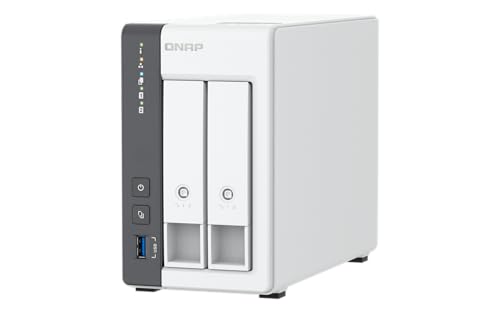
UGREEN NAS DXP2800
Badge: Best for creators and media apps
The UGREEN combines 2 HDD bays and two M.2 NVMe SSD slots for up to 80TB with an Intel N100 quad-core processor, 8 GB of DDR5 RAM, and a 2.5GbE connection. It measures 9.33 x 4.29 x 6.97 inches, includes a 4K HDMI port, and supports Docker, virtual machines, and media server applications compatible with Plex. The trade-off is the HDD bay count: only 2 bays hold spinning drives.
| Spec | From the listing |
|---|---|
| Drive bays | 2 bays, diskless |
| Processor | Intel N100 quad-core |
| Memory | 8 GB DDR5 RAM |
| Network | 2.5GbE |
| Maximum storage | Up to 80TB |
| Dimensions | 9.33 x 4.29 x 6.97 inches |
TERRAMASTER F6-424
Badge: Best for maximum bays
Six drive bays lead the TerraMaster, backed by an Intel N95 quad-core processor at up to 3.4GHz, 8 GB of DDR5 memory at 4800MHz upgradable to 32 GB, and dual 2.5GbE ports with link aggregation up to 5 Gb. It measures 8.74 x 9.45 x 6.06 inches, includes dual M.2 NVMe slots for SSD caching and dual USB 3.2 ports at 10Gbps, and supports RAID 0, 1, 5, 6, 10, JBOD, Single, TRAID, and TRAID+. The trade-off is the starting point: six bays give the widest drive plan here, but the unit arrives diskless. Skip it if only two drives are planned.
| Spec | From the listing |
|---|---|
| Drive bays | 6 bays, diskless |
| Processor | Intel N95 quad-core, up to 3.4GHz |
| Memory | 8 GB DDR5 4800MHz, upgradable up to 32 GB |
| Network ports | Dual 2.5GbE ports, link aggregation up to 5 Gb |
| Extra ports | Dual USB 3.2 10Gbps, dual M.2 NVMe slots |
| Dimensions | 8.74 x 9.45 x 6.06 inches |

Buying Checklist
- Count the drives needed now and later, then match that to 2, 4, or 6 bays.
- Check whether drives are included or the unit is diskless.
- Compare the stated memory at setup and the maximum, from 4 GB to 32 GB.
- Measure the shelf against the stated dimensions, including the 9.45-inch TerraMaster width.
- Confirm the 2.5GbE port count and link aggregation.
- Check the stated warranty length and the DX525 path to 9 bays.
FAQ
How many bays should a first NAS have?
A 2-bay unit holds two drives, a 4-bay unit holds four, and a 6-bay unit holds six, so the choice follows the drives needed now plus room for later drives. The two Synology bundles also state expansion to 9 bays with a DX525 unit.
Do diskless NAS units include drives?
No, the three diskless units in this group arrive without drives, so the QNAP, UGREEN, and TerraMaster units need drives bought separately. The two Synology bundles arrive with drives included, at 24TB in 4x 6TB drives and 48TB in 4x 12TB drives.
What does 2.5GbE change compared with a slower network port?
A 2.5GbE port carries a higher network speed than a 1GbE port, which matters when large files move between computers and storage. Every unit in this group carries 2.5GbE networking, and the TerraMaster states link aggregation up to 5 Gb.
Final Verdict
The 24TB Synology bundle is the clearest starting point for a buyer who wants drives included, two 2.5GbE ports, and expansion to 9 bays. The 48TB bundle suits a larger library with twice the included capacity in the same bay count. The QNAP covers a simple 2-bay plan, the UGREEN covers creator apps with 8 GB of DDR5 memory, and the TerraMaster covers the largest drive plan with 6 bays and link aggregation up to 5 Gb.
Prime covers fast, free delivery on eligible items. See whether a Prime free trial is available for your account.
Check Prime on Amazon →Types of Home Networking and NAS Gear
Home networking and NAS gear is grouped mainly by cable category and by drive-bay count. Cat6 and Cat6a ethernet cables support different maximum speeds over different maximum distances, which matters for longer in-wall or whole-home runs. Multi-bay NAS enclosures support more drives for larger storage pools or redundancy.
An ethernet powerline kit sends network data over a home's existing electrical wiring instead of running a new cable, which is more convenient to install but generally less consistent in speed than a direct ethernet cable run.
Frequently Asked Questions
What's the difference between Cat6 and Cat6a ethernet cable?
Cat6a supports higher speeds over longer distances than Cat6, which matters most for longer cable runs or future-proofing a wired network beyond typical home internet speeds.
Is a powerline networking kit as reliable as a direct ethernet cable?
Generally not quite -- it's more convenient to install since it uses existing electrical wiring, but speed and reliability can vary more than a direct ethernet cable run depending on a home's wiring quality.
Related Guides
 Best 15 Inch Laptop Cooling Pad: Five Pads ComparedCompare five 15 inch laptop cooling pads with one to nine fans, up to…Read next →
 Best 3D Scanner for Printing Figurines: Five Picks ComparedCompare five 3D scanners for printing figurines on stated accuracy, scan range, color capture…Read next →
 Best Printer for Home and Office: 5 Picks ComparedCompare five printers for home and office, from a 7.55-pound color all-in-one to a…Read next →






Write Your Review
No reviews yet. Be the first to share your experience!