
If you want the largest local storage in this set, the Dell 15.6-inch model with 512GB SSD is the clear starting point, while the HP OmniBook 3 suits anyone who wants the largest screen and the sharpest display here. All five run Windows 11, yet they split clearly on screen size, memory, storage, ports and battery figures.
We compared processor, memory, storage, display and ports for each model. Memory runs from 4GB to 16GB and storage from 128GB to 512GB.
As an Amazon Associate, we earn from qualifying purchases.
Pick by Your Need
- Best overall: Dell 15.6-Inch Core 3 Laptop, with 8GB DDR5 memory and 512GB SSD storage.
- Best large screen: HP OmniBook 3 16-Inch 2K Laptop, with the largest and sharpest screen here.
- Best memory for multitasking: MITUNTUN 15.6-Inch Windows 11 Pro Laptop, with 16GB RAM, the most here.
- Best for carrying every day: HP Everyday Slim 14-Inch Laptop, at 3.24 lbs.
- Best for video calls and connections: Acer Aspire Go 15 AI-Ready Laptop, with dual USB Type-C ports.
Quick Answer
Choose the Dell 15.6-inch model for the most local storage, the HP OmniBook 3 for the largest and sharpest screen, and the MITUNTUN 15.6-inch model for the most memory. For a lighter machine, the HP Everyday Slim at 3.24 lbs is the one to weigh against the larger options.
Comparison Table
| Laptop | Best for | Screen, memory and storage | Trade-off |
|---|---|---|---|
| HP OmniBook 3 | Largest screen | 16 in 2K; 4GB; 128GB UFS | Lowest memory and storage |
| MITUNTUN 15.6-Inch | Most memory | 15.6 in FHD; 16GB; 256GB SSD | Processor figures disagree |
| Acer Aspire Go 15 | Calls and ports | 15.6 in FHD IPS; 8GB; 128GB UFS | Smallest storage; S Mode |
| Dell 15.6-Inch | Most storage | 15.6 in FHD; 8GB DDR5; 512GB SSD | No weight or runtime stated |
| HP Everyday Slim | Lightest to carry | 14 in HD; 1TB cloud storage | Lowest resolution; memory unconfirmed |
Decision Guide
Start with screen size. The HP OmniBook 3 has a 16-inch 2K display and a body of 14.12 by 9.91 inches at 0.61 inches thick. The HP Everyday Slim has a 14-inch screen, the smallest screen here, and the lightest stated weight at 3.24 lbs.
Next, weigh memory against storage. The MITUNTUN model states 16GB RAM, the highest figure here, with 256GB SSD storage. The Acer and Dell models state 8GB, and the HP OmniBook 3 states 4GB. For storage, the Dell model states 512GB SSD, double the MITUNTUN figure and four times the 128GB figure elsewhere.
Check the display and ports too. The HP OmniBook 3 is the only model with a 2K display, while the MITUNTUN and Acer models state Full HD at 1920 x 1080, and the HP Everyday Slim states HD at 1366 x 768. The Dell model states 300 nits against 250 nits on the HP Everyday Slim. The Acer model names the widest port set, with 2 USB Type-C ports and 1 HDMI 2.1 port.
Battery figures use different units. The HP Everyday Slim states up to 11.5 hours of video playback and 7.5 hours of streaming, the only runtime in hours here. The Dell model states a 3-cell 41WHr battery, and the MITUNTUN model states a 5000mAh battery.
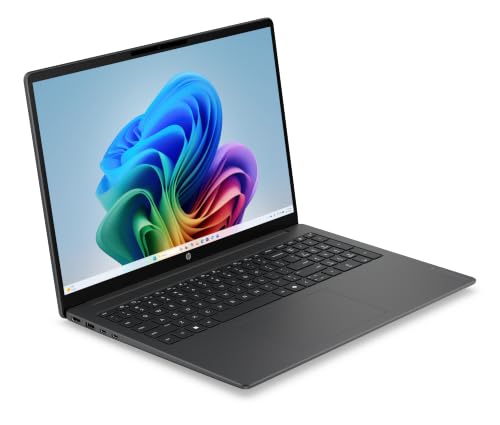
HP OmniBook 3 16-Inch 2K Laptop
Badge: Best Large Screen
This model stands apart on display size, with a 16-inch diagonal 2K display against 15.6-inch Full HD screens on three rivals and a 14-inch HD screen on the fifth. Its Snapdragon C1-10-100 processor runs up to 3.0 GHz with 8 cores, and at 0.61 inches thick it is the thinnest body here. The trade-off is plain: 4GB of memory is the lowest figure here, and 128GB UFS storage is tied for the lowest.
| Spec | From the listing |
|---|---|
| Display | 16-inch diagonal 2K display |
| Processor | Snapdragon C1-10-100, up to 3.0 GHz, 8 cores |
| Memory and storage | 4GB memory; 128GB UFS storage |
| Dimensions | 14.12 x 9.91 x 0.61 inches |
MITUNTUN 15.6-Inch Windows 11 Pro Laptop
Badge: Best Memory for Multitasking
This model offers the most memory in the set, with 16GB RAM against 8GB on the Acer and Dell models and 4GB on the HP OmniBook 3, with 256GB SSD storage. Its 15.6-inch Full HD screen measures 1920 x 1080 and opens to 180 degrees, and the body weighs 3.5 lbs. The facts describe it as 0.8 inches slim, while the spec table gives a height of 0.7 inches. One point needs a check: the model heading reads Core M3 (Beat N4000) while the processor facts state Intel Core M3 up to 2.2 GHz, so check the product page to confirm which processor ships. The trade-off is that the processor runs up to 2.2 GHz, below the 3.0 GHz figure on the HP OmniBook 3.
| Spec | From the listing |
|---|---|
| Display | 15.6-inch Full HD, 1920 x 1080, 16:9 aspect ratio |
| Processor | Intel Core M3, up to 2.2 GHz; heading reads Core M3 (Beat N4000) |
| Memory and storage | 16GB RAM; 256GB SSD |
| Weight and thickness | 3.5 lbs; 0.8 inches in facts, 0.7 inches in spec table |
Acer Aspire Go 15 AI-Ready Laptop
Badge: Best for Video Calls and Connections
This model names the widest connection set in the group, with dual USB Type-C ports, HDMI 2.1, Wi-Fi 6 and Bluetooth 5.1 or above. Its 15.6-inch Full HD IPS display measures 1920 x 1080, and the 720p HD camera pairs Acer TNR technology with PurifiedVoice. The Intel Core 3 processor N355 works with 8GB DDR5 memory and 128GB UFS storage, with a Copilot key. The trade-off is storage: 128GB UFS is tied for the smallest figure here, one quarter of the Dell figure.
| Spec | From the listing |
|---|---|
| Display | 15.6-inch FHD 1920 x 1080 IPS display |
| Processor and memory | Intel Core 3 processor N355; 8GB DDR5 memory |
| Storage | 128GB UFS storage |
| Ports | 2 USB Type-C, 2 USB 3.2 Gen 1, 1 HDMI 2.1, headphone jack |
Dell 15.6-Inch Core 3 Laptop
Badge: Best Overall
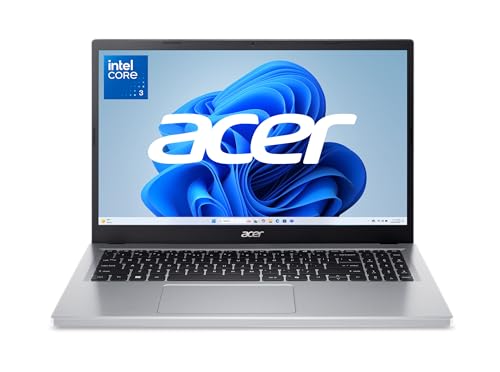
This model pairs the largest local storage in the set with a practical everyday feature set, stating 512GB SSD storage against 256GB on the MITUNTUN model and 128GB on the Acer and HP OmniBook 3 models. Its 15.6-inch Full HD display states 300 nits with anti-glare WVA and ComfortView software. The Intel Core 3 100U processor works with 8GB DDR5 memory and Intel UHD Graphics, and the keyboard includes a numeric keypad with a calculator hotkey. The 3-cell 41WHr battery supports Express Charge. The trade-off is that the facts give no weight figure and no battery runtime in hours, so portability cannot be compared against the 3.24-lb HP Everyday Slim model.
| Spec | From the listing |
|---|---|
| Display | 15.6-inch FHD, 300 nits, anti-glare WVA |
| Processor and memory | Intel Core 3 100U; 8GB DDR5 RAM |
| Storage | 512GB SSD |
| Battery | 3-cell 41WHr battery; Express Charge support |

HP Everyday Slim 14-Inch Laptop
Badge: Best for Carrying Every Day
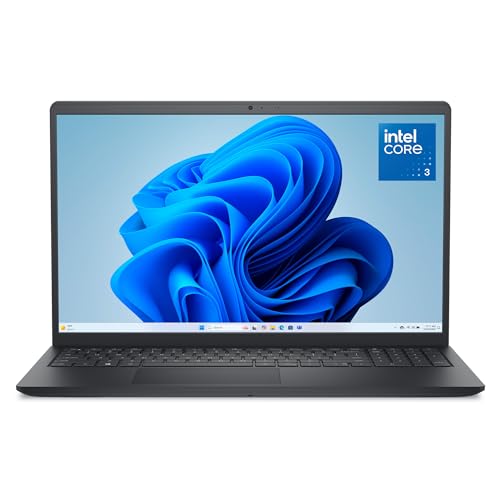
This model is the lightest in the set, weighing 3.24 lbs, with the smallest screen at 14 inches and a footprint of 12.76 by 8.86 inches. It states up to 11.5 hours of video playback and 7.5 hours of streaming. The 14-inch HD screen measures 1366 x 768 at 250 nits with anti-glare technology. One point needs a check: the size field reads 32GB RAM and 1TB SSD, while the facts state 1TB cloud storage and Microsoft 365 included, with no RAM or SSD amount stated, so treat those figures as unconfirmed until you check the product page. The trade-off is the screen: 1366 x 768 is the lowest resolution here, below Full HD and 2K on the HP OmniBook 3.
| Spec | From the listing | |
|---|---|---|
| Display | 14-inch HD 1366 x 768, 250 nits, anti-glare | |
| Processor | Intel N150 processor; Intel Graphics | |
| Memory and storage | Size field reads 32GB RAM \ | 1TB SSD; facts state 1TB cloud storage, no RAM or SSD amount — check the product page |
| Weight and size | 3.24 lbs; 12.76 x 8.86 x 0.71 inches |
Buying Checklist
- Measure your bag and desk space first, then compare the stated footprints for each model.
- Check the memory and storage figures against your files and apps: 4GB to 16GB, 128GB to 512GB.
- Check the display figures: 2K, Full HD at 1920 x 1080, HD at 1366 x 768, and 300 or 250 nits.
- Check the return window on the product page, and confirm any conflicting figure there.
- Compare two or three finalists side by side.
FAQ
How much memory and storage should I look for in a Windows laptop?
Memory in this set runs from 4GB on the HP OmniBook 3 to 16GB on the MITUNTUN model, with 8GB on the Acer and Dell models, and storage runs from 128GB to 512GB SSD. If you keep many apps open, the 16GB figure gives the most headroom here, and if you keep many files, the 512GB SSD figure on the Dell model holds the most.
Is a 14-inch or a 16-inch screen the better choice?
It depends on how you carry and use the laptop. The 16-inch HP OmniBook 3 gives the largest screen and the only 2K display here, while the 14-inch HP Everyday Slim gives the smallest screen at 14 inches and the lightest stated weight at 3.24 lbs.
What should I check on the product page before ordering?
Confirm the figures that conflict in the listings above. On the MITUNTUN model, check whether the processor is the Intel Core M3 up to 2.2 GHz stated in the facts, since the heading reads Core M3 (Beat N4000). On the HP Everyday Slim, check the RAM and SSD amounts against the size field, which reads 32GB RAM and 1TB SSD.
Final Verdict
The Dell 15.6-inch model is the most rounded pick here, pairing 8GB DDR5 memory with 512GB SSD storage, the largest storage figure in the set, plus a 300-nit anti-glare display. If the screen matters most, the HP OmniBook 3 answers with its 16-inch 2K display, and if memory matters most, the MITUNTUN model answers with 16GB RAM. For carrying, the HP Everyday Slim at 3.24 lbs is the lightest option, while the Acer model is the pick for the widest named port set.
Prime covers fast, free delivery on eligible items. See whether a Prime free trial is available for your account.
Check Prime on Amazon →Related Guides
 Best Hue Bridge Alternative Hubs and Accessories ComparedOnly one of these five picks is a real hub, and it is the…Read next →
 “Best UPS Backup for Home Office: Compare 5 Top Models”"Compare five UPS backups for home office use, from 500VA to 1000VA, with runtimes…Read next →
 Best Gaming Wrist Rests: Gel, Resin and Mouse SupportsCompare five gaming wrist rests by stated length, width and material, from a gel…Read next →


Write Your Review
No reviews yet. Be the first to share your experience!