
Pick the ASUS ROG PG32UCDP if you want one screen covering both 4K play at 240Hz and a faster FHD mode at 480Hz, the Alienware AW3425DW if you want the widest view, and either 27-inch ASUS model if your desk points to a smaller panel. All five monitors here state an OLED panel and a 240Hz refresh rate, so none misses the keyword’s core requirements. The real split is size, resolution, curve and panel type: three state QD-OLED panels, two state WOLED, three state 3840 x 2160, one states 3440 x 1440 and one states 2560 x 1440.
That spread matters more than the shared headline figures. Every model states a 0.03ms response time, so response time does not separate them. Screen area, pixel count, curvature and stated extras do: the Acer adds a 1700R curve, the Alienware stretches to 34.2 inches with an 1800R curve, and the PG27UCDM adds DisplayPort 2.1 and a proximity sensor.
As an Amazon Associate, we earn from qualifying purchases.



Pick by Your Need
- Best overall: ASUS ROG PG32UCDP. Its dual mode covers 4K at 240Hz and FHD at 480Hz on one 32-inch panel.
- Best curved 4K: Acer Predator X32 X. A 1700R curve wraps a 31.5-inch QD-OLED panel at 3840 x 2160.
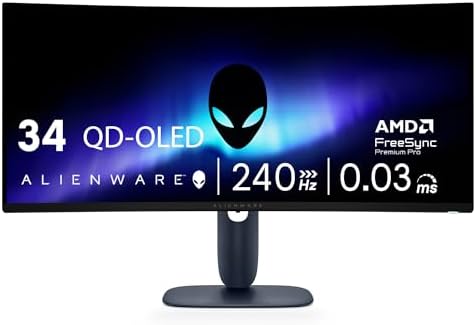
- Best ultrawide: Alienware AW3425DW. The 34.2-inch panel states 3440 x 1440 resolution and an 1800R curve.
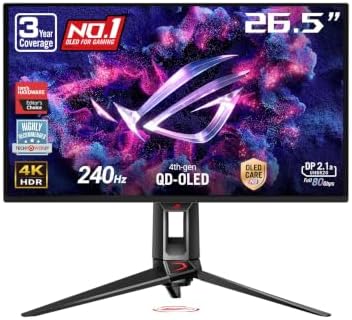
- Best compact 4K: ASUS ROG PG27UCDM. It keeps 3840 x 2160 and 240Hz in a 24.0-inch-wide body.
- Best 1440p pick: ASUS ROG XG27AQDMG. QHD resolution, a glossy WOLED panel and the lowest stated weight here.
Quick Answer
The PG32UCDP is the most flexible choice, its dual mode stating two refresh and resolution pairings. The Alienware AW3425DW suits players who want width over pixel count. The PG27UCDM suits a smaller desk that still needs 4K, at 24.0 inches wide and 16.8 pounds.
Comparison Table
| Product | Best for | Key stated figure | Trade-off | Buy |
|---|---|---|---|---|
| ASUS ROG PG32UCDP | Switching between 4K and faster FHD play | 32-inch 3840 x 2160 WOLED, 240Hz or FHD 480Hz | No curve stated; WOLED rather than QD-OLED | View on Amazon |
| Acer Predator X32 X | Curved 4K gaming | 31.5-inch 3840 x 2160 QD-OLED, 1700R curve | Heaviest of the five at 21.4 pounds | View on Amazon |
| Alienware AW3425DW | Ultrawide immersion | 34.2-inch 3440 x 1440 QD-OLED, 1800R curve | Widest body here; WQHD rather than 4K | View on Amazon |
| ASUS ROG PG27UCDM | 4K on a smaller desk | 26.5-inch 3840 x 2160 QD-OLED, DisplayPort 2.1 | Smallest screen area of the three 4K models | View on Amazon |
| ASUS ROG XG27AQDMG | 1440p at 240Hz | 26.5-inch 2560 x 1440 WOLED, glossy panel | Lowest pixel count of the five | View on Amazon |
Decision Guide
Start with resolution. If you need 3840 x 2160, three models state it: the PG32UCDP at 32 inches, the Acer X32 X at 31.5 inches and the PG27UCDM at 26.5 inches. Choose the PG32UCDP if you also want the stated FHD 480Hz mode, the Acer if you want a curve, and the PG27UCDM if width is limited, since its 24.0-inch width is 4.1 inches narrower than the PG32UCDP.
If you need width more than height, the Alienware is the only ultrawide here, at 31.71 inches long, 3440 x 1440 and 1800R, so it asks for the most desk width while giving fewer vertical pixels than any 4K model.
If you need a lighter screen, compare the stated weights directly. The XG27AQDMG states 14.8 pounds, the PG32UCDP 16.1 pounds, the PG27UCDM 16.8 pounds, the Alienware 20.04 pounds and the Acer 21.4 pounds, so the Acer is the heaviest stated and the XG27AQDMG the lightest stated.
If panel care features matter, read the stated extras closely. The PG27UCDM states OLED Care Pro with a Neo Proximity Sensor that switches to a black screen when the user is away, while the Acer and the Alienware state no equivalent care routine in the details given here. Check the product page for current details before ordering.
1. ASUS ROG PG32UCDP — Best overall
This is the only monitor here with two stated operating modes: a 32-inch 4K WOLED panel at 3840 x 2160 and 240Hz, or FHD at 480Hz. That makes it the pick for a player who runs detailed story games and fast competitive titles on one desk, since the mode change trades resolution for refresh rate without a second screen. It states a 0.03ms response time, G-SYNC compatibility, a custom heatsink and USB-C, plus AI Crosshair, AI Sniper and AI Visual functions. Its body measures 28.1 inches wide, 22.8 inches high and 10.8 inches long at 16.1 pounds, mid-pack on weight and the tallest of the five.
| Spec | From the listing |
|---|---|
| Panel size and type | 32-inch WOLED |
| Resolution and refresh | 3840 x 2160 at 240Hz, or FHD at 480Hz |
| Response time | 0.03ms |
| Dimensions | 28.1 inches wide, 22.8 inches high, 10.8 inches long |
| Weight | 16.1 pounds |
| Curvature | The listing does not state it |
2. Acer Predator X32 X — Best curved 4K
The Acer pairs the joint-highest resolution here, 3840 x 2160, with the tightest stated curve, 1700R, on a 31.5-inch QD-OLED panel. It states a 240Hz refresh rate, a 0.03ms response time, true 10-bit color and VESA DisplayHDR True Black 400, plus both AMD FreeSync and NVIDIA G-Sync compatibility. Its body measures 28.11 inches wide, 21.5 inches high and 13.62 inches long, and at 21.4 pounds it is the heaviest stated here. Skip it if your desk depth is tight.
| Spec | From the listing |
|---|---|
| Panel size and type | 31.5-inch QD-OLED |
| Resolution and refresh | 3840 x 2160 at 240Hz |
| Response time | 0.03ms (G to G) |
| Curvature | 1700R |
| Dimensions | 28.11 inches wide, 21.5 inches high, 13.62 inches long |
| Weight | 21.4 pounds |
3. Alienware AW3425DW — Best ultrawide
The Alienware is the only ultrawide in this group: a 34.2-inch QD-OLED panel at 3440 x 1440 with an 1800R curve, a 240Hz refresh rate and a 0.03ms response time. It states VESA DisplayHDR TrueBlack 400, 1000 nits peak HDR brightness and an infinite contrast ratio, which separates it from the Acer on stated HDR brightness. Its body is the widest here at 31.71 inches long, 9.13 inches wide and 21.84 inches high, and at 20.04 pounds it is the second heaviest of the five. The trade is plain: you gain horizontal field of view and lose vertical resolution against every 4K model here.
| Spec | From the listing |
|---|---|
| Panel size and type | 34.2-inch QD-OLED |
| Resolution and refresh | 3440 x 1440 at 240Hz |
| Response time | 0.03ms |
| Curvature | 1800R |
| Dimensions | 31.71 inches long, 9.13 inches wide, 21.84 inches high |
| Weight | 20.04 pounds |
4. ASUS ROG PG27UCDM — Best compact 4K
This model keeps the full 3840 x 2160 resolution and 240Hz refresh rate while shrinking the panel to 26.5 inches, so it packs the same pixel count as the 32-inch models into a smaller area. It states 4th-gen QD-OLED technology, a 0.03ms response time, DisplayPort 2.1 and G-SYNC support, plus OLED Care Pro with a Neo Proximity Sensor that switches to a black screen when the user is away. Its body is 24.0 inches wide, 21.6 inches high and 8.6 inches long at 16.8 pounds. Skip it if you sit far from the screen, since 4K detail at this size rewards a closer viewing distance.
| Spec | From the listing |
|---|---|
| Panel size and type | 26.5-inch QD-OLED |
| Resolution and refresh | 3840 x 2160 at 240Hz |
| Response time | 0.03ms |
| Dimensions | 24.0 inches wide, 21.6 inches high, 8.6 inches long |
| Weight | 16.8 pounds |
| Curvature | The listing does not state it |
5. ASUS ROG XG27AQDMG — Best 1440p pick
The XG27AQDMG is the only model here that steps down to 2560 x 1440, stating that QHD resolution on a 26.5-inch glossy WOLED panel at 240Hz with a 0.03ms response time. In return it is the lightest stated here at 14.8 pounds and the lowest in stated height at 20.0 inches, with a body 23.82 inches wide and 8.62 inches long. It states third-generation WOLED technology, a custom heatsink, an advanced airflow design, ASUS OLED Care functions and G-SYNC compatibility. Against its same-size rival, the PG27UCDM, it gives up 4K resolution and the proximity sensor but weighs 2.0 pounds less.
| Spec | From the listing |
|---|---|
| Panel size and type | 26.5-inch WOLED, glossy |
| Resolution and refresh | 2560 x 1440 at 240Hz |
| Response time | 0.03ms |
| Dimensions | 23.82 inches wide, 20.0 inches high, 8.62 inches long |
| Weight | 14.8 pounds |
| Curvature | The listing does not state it |
Shopping Checklist
Use these steps before you settle on one of the five:
- Measure your desk width and depth, then compare them with the stated dimensions of your finalist.
- Decide the resolution you need first: 3840 x 2160, 3440 x 1440 or 2560 x 1440.
- Check whether a curve is stated, and note the radius, since 1700R and 1800R differ.
- Check the stated weight against what your desk or arm is rated to hold.
- Check the return window on the product page before ordering.
FAQ
Does a 240Hz OLED monitor have to be 4K?
No. Three of these five state 3840 x 2160, but the Alienware states 3440 x 1440 and the XG27AQDMG states 2560 x 1440, and both still state 240Hz and an OLED panel. Choose by the resolution your games and hardware can drive at that refresh rate.
What separates QD-OLED from WOLED in this group?
Three models state QD-OLED panels: the Acer, the Alienware and the PG27UCDM. Two state WOLED: the PG32UCDP and the XG27AQDMG. The stated extras differ more than the panel label does, so compare specific features such as the PG32UCDP dual mode or the PG27UCDM proximity sensor.
Which of these is easiest to fit on a small desk?
The XG27AQDMG and the PG27UCDM are the narrowest across, at 23.82 and 24.0 inches wide. The Alienware states 31.71 inches as its length and 9.13 as its width, so it needs the most room. Compare those numbers with your measured desk space, not screen size alone.
Final Verdict
All five monitors meet the 240hz monitor oled keyword on stated figures, with OLED panels, 240Hz refresh rates and 0.03ms response times throughout. The PG32UCDP is the most versatile for its stated 480Hz FHD mode, the Alienware is the choice for width, and the PG27UCDM is the choice for 4K in a smaller body. The Acer suits a curve with 4K, and the XG27AQDMG suits anyone who accepts 1440p for the lightest stated build. Decide on resolution and desk space first.
Prime covers fast, free delivery on eligible items. See whether a Prime free trial is available for your account.
Check Prime on Amazon →Types of Computer Monitors
Monitors outside gaming-specific models are grouped mainly by resolution and by shape. 1080p and 1440p monitors cover most general and productivity use. 4K monitors show more detail but need more GPU power to drive at full resolution. Portable monitors add a second screen for a laptop without a permanent desk setup.
A dual-monitor stand or mount lets two screens be positioned consistently at the same height and distance, which matters for reducing neck strain compared to two separate, mismatched stands at different heights.
Frequently Asked Questions
What resolution is a reasonable default for general desk use?
1440p is a common middle ground, offering more detail than 1080p without the GPU demands or price premium of a 4K panel at typical desk viewing distances.
Does a portable monitor need its own power source?
Many draw power directly from the connected laptop over USB-C, though some higher-brightness portable monitors need a separate power adapter for full performance.
Related Guides
No internal links were supplied for this guide, so this section lists none.
Product and ASIN Reference
| Product | ASIN | Buy |
|---|---|---|
| ASUS ROG PG32UCDP | B0D7NNK43H | View on Amazon |
| Acer Predator X32 X | B0D8LFHH4D | View on Amazon |
| Alienware AW3425DW | B0F6724X5N | View on Amazon |
| ASUS ROG PG27UCDM | B0DM6SHQTN | View on Amazon |
| ASUS ROG XG27AQDMG | B0CZWM44QP | View on Amazon |






Write Your Review
No reviews yet. Be the first to share your experience!