
Desktop builders who want an unbuffered kit should start with the Crucial, OWC or NEMIX listings, anyone chasing the highest stated speed should look at the G.SKILL kit, and server or workstation owners are the only buyers the A-Tech kit fits. Four of the five listings state desktop UDIMM memory, while the A-Tech listing states ECC Registered server and workstation memory that it states will not work with desktop computers, laptop computers or PCs of any kind.
We compared the five listings on stated capacity, module count, speed, latency, voltage and memory type. Three kits state 128GB, two state 64GB, and stated speeds run from 2133MHz on the A-Tech kit to up to 3600MT/s on the G.SKILL kit, which its listing ties to overclocking and BIOS adjustments.
As an Amazon Associate, we earn from qualifying purchases.



Pick by Your Need
- Best overall: Crucial 64GB Kit. It states 3200MHz operation with downclocking to 2933MHz or 2666MHz in two 32GB desktop sticks.
- Best for servers: A-Tech 128GB Kit. It states ECC Registered RDIMM memory for select DDR4 servers and workstations only.
- Best for 128GB capacity: OWC 128GB Kit. It states four 32GB Non-ECC modules at 3200MHz with CL22 latency.
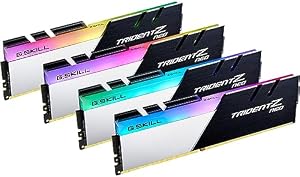
- Best for stated speed: G.SKILL Trident Z Neo. It states up to 3600MT/s with CL16-19-19-39 timings under an XMP profile.
- Best for fit checks: NEMIX RAM 128GB Kit. It states a 288-pin desktop DIMM form factor and directs buyers to check board capacity and slots.
Quick Answer
For a desktop build, the Crucial 64GB kit is the simplest match, with two 32GB UDIMM sticks at 3200MHz, while the OWC and NEMIX kits each state 128GB across four 32GB sticks at the same speed. The G.SKILL kit states the highest speed, up to 3600MT/s, and the A-Tech kit belongs only in the servers and workstations its listing states.
Comparison Table
| Product | Best for | Key stated figure | Trade-off |
|---|---|---|---|
| Crucial 64GB Kit (2x32GB) | Two-stick desktop upgrades | 3200MHz, CL22, 288-pin UDIMM | 64GB total, half the capacity of the three 128GB kits |
| A-Tech 128GB Kit (8x16GB) | Select servers and workstations | 2133MHz ECC Registered RDIMM, 1.2V | Server and workstation memory only; the listing states it will not work in desktops or laptops |
| OWC 128GB Kit (4x32GB) | 128GB in four desktop sticks | 3200MHz, CL22, 2Rx8, 1.2V | Needs four free DIMM slots; no module dimensions stated |
| G.SKILL Trident Z Neo 64GB (4x16GB) | Stated XMP speed and timings | Up to 3600MT/s, CL16-19-19-39, 1.35V | Top stated speed requires overclocking and BIOS adjustments |
| NEMIX RAM 128GB Kit (4x32GB) | Desktop and tower upgrades | 3200MHz, CL22, 2Rx8, 1.2V | Needs four free DIMM slots and a board that supports 128GB |
Decision Guide
If you need memory for a desktop or tower PC, choose among the Crucial, OWC, G.SKILL and NEMIX kits, because those four listings state desktop UDIMM or U-DIMM memory. If you need ECC Registered memory for a server or workstation, the A-Tech kit is the only one of the five stating that type, limited to select DDR4 server and workstation systems.
If your board has only two free DIMM slots, choose the Crucial kit, the only two-module listing here, at 32GB per stick. If your board has four free slots and you want the largest stated capacity, the OWC and NEMIX kits tie at 128GB from four 32GB sticks, while the A-Tech kit states the same 128GB across eight 16GB server modules. If stated speed matters most, the G.SKILL kit states up to 3600MT/s against 3200MHz for the Crucial, OWC and NEMIX kits and 2133MHz for the A-Tech kit, but its listing ties that maximum to overclocking, BIOS adjustments and the motherboard and CPU. On latency, the G.SKILL kit states CL16-19-19-39, three listings state CL22, and the A-Tech states none; on voltage, the A-Tech, OWC and NEMIX listings state 1.2V, the G.SKILL states 1.35V, and the Crucial states none. Check the product page for current details before ordering.
1. Crucial 64GB DDR4 Kit — Best for a 2-stick 64GB upgrade
The Crucial kit is the only two-module listing here, pairing two 32GB sticks for 64GB in a 288-pin UDIMM desktop format. Its listing states operation at 3200MHz, 2933MHz or 2666MHz, so the same kit covers boards that run below 3200MHz. Against the three 128GB kits it gives up total capacity, but it leaves two slots free on a four-slot board.
Pros
- States 3200MHz operation with downclocking to 2933MHz and 2666MHz
- Two 32GB sticks leave two slots free on a four-slot board
- States compatibility checking through the Crucial System Scanner and Upgrade Selector tools
Cons
- 64GB total, half the stated capacity of the three 128GB kits
- Listing states no voltage figure
| Spec | From the listing |
|---|---|
| Kit capacity | 64GB kit (32GB x 2) |
| Speed | 3200MHz, downclockable to 2933/2666MHz |
| Latency | CL22 |
| Form factor | UDIMM, 288-pin |
| Dimensions | 5.25 x 0.03 x 1.23 inches |
| Weight | 0.08 pounds |
2. A-Tech 128GB ECC RDIMM Kit — Best for stated server and workstation f
This A-Tech kit is not desktop memory: its listing states ECC Registered RDIMM memory for select DDR4 servers and workstation systems only, and states that it will not work with desktop computers, laptop computers or PCs of any kind. It reaches 128GB across eight 16GB modules, the highest module count of the five, in a 2Rx4 dual rank layout at 1.2V. Its stated speed is 2133MHz PC4-17000, the lowest stated speed here, and its listing states no latency figure.
Pros
- States ECC Registered memory for server and workstation boards
- 128GB total capacity, tied for the largest stated kit size here
- States the JEDEC DDR4 standard at 1.2V
Cons
- Listing states it will not work in desktop, laptop or PC systems
- Lowest stated speed of the five at 2133MHz
| Spec | From the listing |
|---|---|
| Kit capacity | 128GB kit (8 x 16GB modules) |
| Speed | 2133MHz PC4-17000 |
| Memory type | ECC Registered RDIMM, 2Rx4 dual rank |
| Voltage | 1.2V |
| Form factor | DIMM, 288-pin |
| Dimensions | 5.25 x 1.23 x 0.15 inches |
Skip it if your machine is a desktop, laptop or gaming PC — the listing limits this kit to select servers and workstations.
3. OWC 128GB DDR4 Kit — Best for 128GB in four 32GB sticks
The OWC kit states 128GB from four 32GB modules, each a 3200MHz PC4-25600 DIMM with CL22 latency and a 2Rx8 layout at 1.2V. It states Non-ECC unbuffered memory, which separates it from the registered A-Tech kit, plus compliance with JEDEC standard specifications. Against the NEMIX kit it states the same capacity, module size, speed, latency, rank and voltage, so the stated figures alone do not separate those two kits. Its listing states no module dimensions and no weight.
Pros
- 128GB total from four 32GB modules, tied for the largest stated kit size
- States 3200MHz speed with CL22 latency at 1.2V
- States an advanced replacement program and a limited lifetime warranty
Cons
- Needs four free DIMM slots to install the full stated capacity
- Listing states no module dimensions or weight
| Spec | From the listing |
|---|---|
| Kit capacity | 128GB kit (4 x 32GB) |
| Speed | 3200MHz PC4-25600 |
| Latency | CL22 |
| Memory type | Non-ECC unbuffered DIMM, 2Rx8 |
| Voltage | 1.2V |
| Form factor | 288-pin |
4. G.SKILL Trident Z Neo 64GB Kit — Best for stated XMP speed and timings
The G.SKILL kit states the highest speed figure of the five, up to 3600MT/s, with the tightest stated latency, CL16-19-19-39, at 1.35V across four 16GB U-DIMM modules for 64GB total. Its listing states that the maximum speed requires overclocking and BIOS adjustments and depends on the motherboard and CPU, and it includes both a JEDEC default profile and an Intel XMP overclock profile. It states Non-ECC memory for desktop PC and gaming use.
Pros
- Highest stated speed of the five, up to 3600MT/s under XMP
- Lowest stated latency figures, CL16-19-19-39
- States both a JEDEC default profile and an Intel XMP profile
Cons
- Top stated speed requires overclocking and BIOS adjustments
- 64GB total, reached with all four slots of a four-slot board
| Spec | From the listing |
|---|---|
| Kit capacity | 64GB (4 x 16GB) |
| Speed | Up to 3600MT/s with XMP |
| Latency | CL16-19-19-39 |
| Voltage | 1.35V |
| Memory type | Non-ECC U-DIMM |
| Form factor | 288-pin |
5. NEMIX RAM 128GB DDR4 Kit — Best for stated desktop fit checks
The NEMIX kit states 128GB from four 32GB UDIMM modules at 3200MHz PC4-25600, with CL22 latency, a 2Rx8 layout and 1.2V, matching the OWC kit on every spec both listings state. It states a 288-pin full-size DIMM form factor for desktops, towers and gaming PCs, and states that it is not a laptop SODIMM. Its listing directs buyers to match the motherboard’s maximum capacity, slot count and supported speed before ordering; it states no dimensions and no weight.
Pros
- 128GB total from four 32GB modules, tied for the largest stated kit size
- States 3200MHz speed with CL22 latency at 1.2V
- States a full-size 288-pin DIMM format for desktops and towers
Cons
- Needs four free DIMM slots and a board that supports 128GB
- Listing states no module dimensions or weight
| Spec | From the listing |
|---|---|
| Kit capacity | 128GB (4 x 32GB) |
| Speed | 3200MHz PC4-25600 |
| Latency | CL22 |
| Memory type | Non-ECC unbuffered UDIMM, 2Rx8 |
| Voltage | 1.2V |
| Form factor | 288-pin DIMM |
Shopping Checklist
Before ordering any of these five kits, work through the checks the listings leave to the buyer:
- Confirm your board takes DDR4 desktop DIMM memory, and rule out the A-Tech kit unless your system is a server or workstation with stated ECC Registered support.
- Count your free DIMM slots and match them to the kit’s module count: two, four or eight sticks.
- Check your motherboard’s maximum capacity against the kit size, 64GB or 128GB.
- Match the kit’s stated speed and voltage against what your board and CPU support, including any XMP requirement.
- Check the return window on the product page in case the kit and your board do not match.
FAQ
Can the A-Tech kit work in a desktop PC?
No, based on its listing. The A-Tech listing states the kit is for select DDR4 server and workstation systems only and states that it will not work with desktop computers, laptop computers or PCs of any kind, because it is ECC Registered RDIMM memory rather than the unbuffered memory the other four listings state.
Do the OWC and NEMIX 128GB kits differ on stated specs?
On the figures both listings state, they match: each states 128GB from four 32GB modules at 3200MHz, CL22 latency, a 2Rx8 layout, 1.2V and Non-ECC unbuffered 288-pin DIMMs. They differ in what else they state around the kit — the OWC listing’s replacement program and warranty statements, the NEMIX listing’s fitment checks — rather than in the headline figures.
Will the G.SKILL kit run at 3600MT/s in any desktop?
Its listing states the up to 3600MT/s figure as a maximum that requires overclocking and BIOS adjustments, and that maximum speed and performance depend on the motherboard and CPU. It also states a JEDEC default profile, so your system’s speed follows what your board and CPU support and what you set in the BIOS.
Final Verdict
For most desktop upgrades, the choice narrows to capacity and slot count: the Crucial kit states 64GB in two sticks, while the OWC and NEMIX kits state 128GB in four sticks at the same 3200MHz and CL22. The G.SKILL kit is the pick when stated speed and latency lead, at up to 3600MT/s and CL16-19-19-39, provided your board supports the XMP overclock its listing requires. The A-Tech kit serves a different machine class, stating ECC Registered memory for select servers and workstations and no desktop or laptop fit at all.
Prime covers fast, free delivery on eligible items. See whether a Prime free trial is available for your account.
Check Prime on Amazon →Related Guides
No internal links were supplied for this post, so this section lists none.
Product and ASIN Reference
| Product | ASIN |
|---|---|
| Crucial 64GB DDR4 RAM Kit (2x32GB) | B07ZLD6Q1G |
| A-Tech 128GB Kit (8x16GB) DDR4 ECC RDIMM | B09LNKN24F |
| OWC 128GB (4x32GB) DDR4 3200MHz DIMM | B0C93GXY78 |
| G.SKILL Trident Z Neo Series DDR4 RAM 64GB (4x16GB) | B07VRMTVH7 |
| NEMIX RAM 128GB (4X32GB) DDR4 3200MHz UDIMM | B0BNLZXSS4 |

Write Your Review
No reviews yet. Be the first to share your experience!