
If you want storage that is ready to use on arrival, pick one of the four Buffalo LinkStation units, because each one states hard drives included; pick the Asustor Drivestor 2 Gen 2 instead if stated network speed and processor figures matter more to you, because its listing states a 2.5-Gigabit Ethernet port and a quad-core processor but states no storage capacity. All five products here are complete NAS systems that connect to a router, not bare hard drives, so each one is judged as a finished network storage unit rather than as a loose drive you install yourself.
The four Buffalo units share the same stated feature set, so they separate mainly on capacity, bay count, dimensions and weight. The Asustor is the only listing that states a processor, memory figure and Ethernet speed, and the only one that states no capacity.
As an Amazon Associate, we earn from qualifying purchases.
Pick by Your Need
- Best overall: Buffalo LinkStation 220 4TB. Two bays and 4TB of included storage cover shared backup for a household.
- Best for large libraries: Buffalo LinkStation 220 8TB. It states the largest capacity here, 8TB across two 4TB drives.
- Best compact: Asustor Drivestor 2 Gen 2. Its stated dimensions are 3.94 inches on every side, the smallest stated footprint of the five.
- Best flat profile: Buffalo LinkStation 210 6TB. It states a height of only 1.77 inches while holding 6TB in one bay.
- Best starter: Buffalo LinkStation 210 2TB. A single bay and 2TB suit a first home backup unit.
Quick Answer
For most households, the Buffalo LinkStation 220 4TB is the middle path: two bays, 4TB included, and the same stated Buffalo feature set as its siblings. Choose the LinkStation 220 8TB if you want the largest stated capacity, and choose the Asustor Drivestor 2 Gen 2 if a stated 2.5-Gigabit Ethernet port and quad-core processor matter more than a stated capacity.
Comparison Table
| Product | Best for | Key stated figure | Trade-off |
|---|---|---|---|
| Buffalo LinkStation 210 2TB | A first single-bay backup unit | 2TB on one included drive | Smallest stated capacity of the five |
| Asustor Drivestor 2 Gen 2 | Stated network and processor speed | 2.5-Gigabit Ethernet port | Listing states no capacity and does not state drives included |
| Buffalo LinkStation 220 4TB | Shared two-bay household storage | 4TB across two included drives | Listing states no Ethernet speed |
| Buffalo LinkStation 220 8TB | The largest media library | 8TB across two included drives | Listing states no Ethernet speed or processor |
| Buffalo LinkStation 210 6TB | High capacity in a flat box | 6TB on one included drive, 1.77 inches tall | Single bay, so no second drive slot |
Decision Guide
If you need storage that works without buying drives separately, choose one of the four Buffalo units, because each states hard drives included. Check the product page for current details before ordering. If you need the most room for video, music and photo libraries, choose the LinkStation 220 8TB, which states 8TB across two 4TB drives. If you need two bays at a smaller capacity, choose the LinkStation 220 4TB, which states 4TB across two 2TB drives in the same stated enclosure size as the 8TB model.
If you need a stated Ethernet speed before you buy, choose the Asustor Drivestor 2 Gen 2, the only listing here that states one: 2.5-Gigabit Ethernet. The four Buffalo listings state router connection but state no Ethernet speed. If you need the unit to sit in a shallow space, choose the LinkStation 210 6TB, which states a height of 1.77 inches, the lowest stated height of the five. If you need the smallest stated footprint, choose the Asustor, at 3.94 inches in length, width and height.
All four Buffalo listings state RAID, a subscription-free personal cloud, a closed system and SSL encryption for file transfers. Only the Asustor listing states a processor (quad-core, 1.7GHz) and memory (1GB DDR4); the Buffalo listings state neither figure.
1. Buffalo LinkStation 210 2TB — Best for a first home NAS

This is a complete 1-bay NAS system with its drive included, not a bare drive: the listing states 2TB on a single 2TB drive. It stands taller than it is wide, at 9.45 inches long, 3.31 inches wide and 8.67 inches high, and it states a weight of 2.43 pounds. Its angle is simplicity: the smallest stated capacity here, one bay, and the same stated Buffalo features, including RAID, SSL encryption and compatibility with Windows and macOS. Its 2TB is the figure to check against your library before anything else.
Pros
- States hard drives included, 2TB on one drive
- States RAID and SSL encryption for secure file transfers
- States compatibility with Windows and macOS
Cons
- Smallest stated capacity of the five, at 2TB
- Listing states no Ethernet speed, processor or memory figure
Skip it if your photo and video library already passes 2TB, because the single bay leaves no second slot to add later.
| Spec | From the listing |
|---|---|
| Capacity | 2TB (1x2TB) |
| Bays | 1 bay |
| Dimensions | 9.45 x 3.31 x 8.67 inches |
| Weight | 2.43 pounds |
| Ethernet speed | The listing does not state it |
| Color | Black |
2. Asustor Drivestor 2 Gen 2 AS1202T — Best stated network speed

This is a complete 2-bay NAS system, and it is the one listing here that reads like a small computer: it states a Realtek RTD1619B quad-core processor at 1.7GHz, 1GB of DDR4 memory and a 2.5-Gigabit Ethernet port. The trade-off is plain in its own listing: it states no storage capacity, and it does not state that drives are included, where all four Buffalo units state both. It is a cube of 3.94 inches on each side and states the heaviest weight of the five, 2.56 pounds. The listing also states a 4K media server, remote access and a mobile app.
Pros
- States a 2.5-Gigabit Ethernet port, the only stated Ethernet speed here
- States a quad-core 1.7GHz processor and 1GB DDR4 memory
- States 4K media server, remote access and mobile app support
Cons
- Listing states no storage capacity
- Listing does not state that drives are included
Skip it if you want storage included on arrival, because this listing states neither a capacity nor included drives.
| Spec | From the listing |
|---|---|
| Capacity | The listing does not state it |
| Bays | 2 bay |
| Dimensions | 3.94 x 3.94 x 3.94 inches |
| Weight | 2.56 pounds |
| Ethernet speed | 2.5-Gigabit Ethernet |
| Color | Black |
3. Buffalo LinkStation 220 4TB — Best two-bay for shared backup
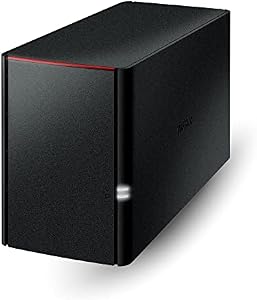
This is a complete 2-bay NAS system with drives included, stating 4TB across two 2TB drives. Its stated enclosure measures 5.04 inches long, 10.0 inches wide and 8.82 inches high, and its stated weight is 1.0 pounds. Against its 8TB sibling it offers the same stated dimensions and the same stated Buffalo feature set at half the stated capacity; against the 1-bay units it adds a second drive slot. The listing states RAID, a subscription-free personal cloud for videos, music and photos, and US-based support on hand 24/7 for installation walkthroughs.
Pros
- States 4TB included across two drives in two bays
- States RAID for centralized storage and backup
- States US-based support on hand 24/7
Cons
- Listing states no Ethernet speed, processor or memory figure
- Widest stated footprint here, at 10.0 inches wide
| Spec | From the listing |
|---|---|
| Capacity | 4TB (2x2TB) |
| Bays | 2 bay |
| Dimensions | 5.04 x 10.0 x 8.82 inches |
| Weight | 1.0 pounds |
| Ethernet speed | The listing does not state it |
| Color | Black |
4. Buffalo LinkStation 220 8TB — Best largest stated capacity
This is a complete 2-bay NAS system with drives included, stating 8TB across two 4TB drives, the largest stated capacity of the five. It shares its stated enclosure dimensions with the 4TB model exactly: 5.04 inches long, 10.0 inches wide and 8.82 inches high. Its stated weight is 0.54 pounds, the lightest stated weight of the five listings. It states the same Buffalo feature set as its siblings: RAID, a closed system to reduce vulnerabilities from third-party apps, SSL encryption, and access to files without monthly fees.
Pros
- States 8TB included, the largest stated capacity here
- States RAID and a closed system for data security
- States the lightest weight of the five, 0.54 pounds
Cons
- Listing states no Ethernet speed, processor or memory figure
- Same wide stated footprint as the 4TB model, 10.0 inches
| Spec | From the listing |
|---|---|
| Capacity | 8TB (2x4TB) |
| Bays | 2 bay |
| Dimensions | 5.04 x 10.0 x 8.82 inches |
| Weight | 0.54 pounds |
| Ethernet speed | The listing does not state it |
| Color | Black |
5. Buffalo LinkStation 210 6TB — Best single-bay capacity
This is a complete 1-bay NAS system with its drive included, stating 6TB on a single 6TB drive, the largest stated capacity here in a one-bay unit. Its shape sets it apart from the other four: it states a height of 1.77 inches, the lowest stated height of the five, with a length of 5.9 inches and a width of 6.88 inches. Its stated weight is 2.43 pounds, which ties the 2TB LinkStation 210 as stated. The listing states the same Buffalo features as its siblings, including router connection for shared network storage across your devices.
Pros
- States 6TB included on one drive, the most stated for a single bay
- States the lowest height of the five, 1.77 inches
- States RAID and subscription-free personal cloud access
Cons
- Single bay, so no second drive slot
- Listing states no Ethernet speed, processor or memory figure
| Spec | From the listing |
|---|---|
| Capacity | 6TB (1x6TB) |
| Bays | 1 bay |
| Dimensions | 5.9 x 6.88 x 1.77 inches |
| Weight | 2.43 pounds |
| Ethernet speed | The listing does not state it |
| Color | Black |
Shopping Checklist
- Measure the shelf or desk space first and compare it with each unit’s stated length, width and height.
- Add up the size of the files you plan to store and compare the total with each stated capacity.
- Decide whether you need one bay or two before comparing models, because the bay count is fixed on each unit.
- Check whether the listing states drives included and a capacity, or states neither, before ordering.
- Check the return window on the product page for the finalists you are comparing side by side.
FAQ
Are any of these bare drives rather than complete NAS units?
No. All five are complete NAS systems that connect to a router. Four Buffalo listings state hard drives included with a stated capacity; the Asustor listing states a 2-bay system but states no capacity and does not state that drives are included.
Which of these states the fastest network connection?
Only the Asustor listing states an Ethernet speed: 2.5-Gigabit Ethernet. The four Buffalo listings state that the unit connects to your router for shared network storage, but they state no Ethernet speed figure.
How much capacity should a home user choose?
The stated capacities here run from 2TB on the single-bay LinkStation 210 to 8TB on the two-bay LinkStation 220, with 4TB and 6TB between them, so measure your current files and leave room above that total.
Final Verdict
We compared five complete NAS systems, and the split is simple: Buffalo if you want capacity and included drives stated up front, Asustor if you want stated network and processor figures. The LinkStation 220 4TB is the balanced pick for shared household backup, the LinkStation 220 8TB states the most room, and the LinkStation 210 6TB puts 6TB in the flattest stated enclosure. The Asustor Drivestor 2 Gen 2 is the only one that states a 2.5-Gigabit Ethernet port, but its listing states no capacity. The LinkStation 210 2TB remains the straightforward starter unit.
Prime covers fast, free delivery on eligible items. See whether a Prime free trial is available for your account.
Check Prime on Amazon →Related Guides
No internal links were supplied for this post, so this section lists none.
Product and ASIN Reference
| Product | ASIN |
|---|---|
| Buffalo LinkStation 210 2TB | B00JKM0A36 |
| Asustor Drivestor 2 Gen 2 AS1202T | B0FTFSGBB1 |
| Buffalo LinkStation 220 4TB | B00JY4QD4A |
| Buffalo LinkStation 220 8TB | B00JY4QJZ8 |
| Buffalo LinkStation 210 6TB | B08DZHL5V5 |

Write Your Review
No reviews yet. Be the first to share your experience!