
Pick the Dell Pro Dock WD25 or the Dell WD19S if the dock itself must carry the Dell brand, and treat the other listings here as alternatives rather than Dell products. Two of the five are not Dell docks at all: the Anker Nano is an Anker product and the Revodok Pro is a UGREEN product, both stated plainly as brand mismatches below. A third listing, the WD19TBS, needs a careful read: its brand signals conflict: the product name states a Dell WD19TBS dock, while the brand field states ANYHDD.
The two Dell-branded docks state 100W and 130W of power delivery, and only three of the five listings state a weight. Read the brand line and the delivery figure first.
As an Amazon Associate, we earn from qualifying purchases.


Pick by Your Need
- Best overall: Dell Pro Dock WD25. The only listing pairing the Dell brand with stated Ethernet, DisplayPort and HDMI in one 100W dock.
- Best for high power delivery: Dell WD19S 180W. It states 130W of power delivery, the highest figure of the five.
- Best for three displays: WD19TBS Thunderbolt Dock. It states up to three displays, including a single 5K and dual 4K, but read its brand note first.
- Best for desk and travel: Anker Nano Docking Station. A 13-in-1 dock with a detachable 6-in-1 hub, though it is Anker, not Dell.
- Best compact: UGREEN Revodok Pro. The smallest and lightest listing here at 0.2 pounds, though it is UGREEN, not Dell.
Quick Answer
For a dock that is actually a Dell product, choose between the Dell Pro Dock WD25, which states 100W of power delivery plus Ethernet and both DisplayPort and HDMI, and the Dell WD19S, which states 130W with HDMI and dual DisplayPort. The Anker Nano and UGREEN Revodok Pro are cross-brand alternatives, but neither one is a Dell docking station.
Comparison Table
| Product | Best for | Key stated figure | Trade-off | Buy |
|---|---|---|---|---|
| Dell Pro Dock WD25 | Dell desks wanting Ethernet and both video outputs | 100W power delivery | No display count or resolution stated | View on Amazon |
| WD19TBS Thunderbolt Dock | Three-display setups | 180W AC adapter | Its brand signals conflict: the product name states a Dell WD19TBS dock, while the brand field states ANYHDD | View on Amazon |
| Anker Nano Docking Station | Desk plus travel use | 13-in-1 with detachable 6-in-1 hub | An Anker product, not a Dell dock | View on Amazon |
| UGREEN Revodok Pro | Small desks and light bags | 0.2 pounds stated weight | A UGREEN product, not Dell, and the power adapter is not included | View on Amazon |
| Dell WD19S 180W | Higher power delivery from a Dell dock | 130W power delivery | Brief listing facts, no port counts stated | View on Amazon |
Decision Guide
If the dock must be a Dell product, narrow the list to the WD25 and the WD19S first, because the Anker Nano and the UGREEN Revodok Pro state other brands outright. Between the two, choose by power delivery and ports: the WD25 states 100W with Ethernet, DisplayPort and HDMI, while the WD19S states 130W with HDMI and dual DisplayPort but no Ethernet. Check the product page for current details before ordering.
If you need three displays, only two listings state support for three: the WD19TBS, which states a single 5K and dual 4K monitors, and the Anker Nano, which states up to 3 monitors through 2 HDMI ports and 1 DisplayPort. The WD19TBS carries a caveat the Anker does not: its brand signals conflict: the product name states a Dell WD19TBS dock, while the brand field states ANYHDD.
If desk footprint matters, compare the stated dimensions: the WD25 measures 8.07 x 3.54 x 1.39 inches at 1.21 pounds; the WD19S measures 1.1 x 3.5 x 8.1 inches at 1.28 pounds.
1. Dell Pro Dock WD25 — Best overall
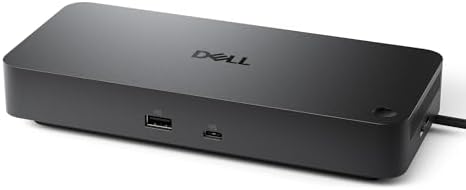
The WD25 is the clearest match for this keyword: a Dell dock stating 100W of power delivery to Dell AI PCs and non-Dell PCs, with DisplayPort, HDMI, Ethernet, USB-A ports and USB-C ports in a body measuring 8.07 x 3.54 x 1.39 inches. Its ambidextrous USB-C cable can be routed left or right, a detail none of the other four listings states. The trade-off is video detail: it states no display count, resolution or refresh rate, so multi-monitor shoppers get fewer stated facts here.
| Spec | From the listing |
|---|---|
| Power delivery | 100W |
| Video outputs | DisplayPort, HDMI |
| Dimensions | 8.07 x 3.54 x 1.39 inches |
| Weight | 1.21 pounds |
| Color | Black |
| Recycled materials | At least 65% post-consumer recycled materials |
2. WD19TBS Thunderbolt Dock — Best for three displays
On stated figures alone, this dock leads the group for displays: Thunderbolt 3 connectivity, an 180W AC adapter, and support for up to three displays, including a single 5K and dual 4K monitors. It also states a built-in 0.8-meter cable and an optional secure VESA mount. The problem is attribution, stated plainly: its brand signals conflict: the product name states a Dell WD19TBS dock, while the brand field states ANYHDD. So this listing does not cleanly match a Dell brand keyword.
| Spec | From the listing |
|---|---|
| Adapter | 180W AC adapter |
| Display support | Up to three displays; single 5K, dual 4K |
| Cable | Built-in 0.8-meter cable |
| Dimensions | The listing does not state it |
| Weight | The listing does not state it |
| Color | Black |
3. Anker Nano Docking Station — Best for desk and travel
This listing is a brand mismatch for the keyword, stated plainly: it is an Anker docking station, not a Dell docking station. What it offers instead is range: a 13-in-1 layout with a detachable 6-in-1 USB-C hub that snaps off for travel, 2 HDMI ports and 1 DisplayPort driving up to 3 monitors, and up to 100W of power delivery backed by a stated 140W power adapter. It also states Gigabit Ethernet, a 3.5mm audio jack and SD and TF card slots, which no other listing here states. Its stated dimensions are 3.74 x 1.57 x 5.51 inches. Skip it if the purchase has to be a Dell product.
| Spec | From the listing |
|---|---|
| Layout | 13-in-1 dock with detachable 6-in-1 hub |
| Power delivery | Up to 100W; 140W power adapter stated |
| Video outputs | 2 HDMI, 1 DisplayPort |
| Data ports | 2 USB-C at 5Gbps and 10Gbps, 3 USB-A |
| Dimensions | 3.74 x 1.57 x 5.51 inches |
| Color | Black |
4. UGREEN Revodok Pro — Best compact
This listing is also a brand mismatch, stated plainly: it is a UGREEN docking station, not a Dell docking station. Its case rests on size and speed: a 7-in-1 aluminum dock measuring 3.1 x 0.8 x 0.49 inches and stating a weight of 0.2 pounds, the lightest of the three listings that state a weight. It states 2 HDMI ports running dual 4K at 60Hz, 2 USB-A and 2 USB-C data ports at 10Gbps, and 100W of power delivery. Two conditions apply: the charging cable and power adapter are stated as not included, and the 10Gbps ports are stated for data only. Skip it if you want the adapter in the box or the Dell brand on the dock.
| Spec | From the listing |
|---|---|
| Layout | 7-in-1 |
| Power delivery | 100W charging port; adapter not included |
| Video outputs | 2 HDMI, dual 4K at 60Hz |
| Dimensions | 3.1 x 0.8 x 0.49 inches |
| Weight | 0.2 pounds |
| Color | Black or grey |
5. Dell WD19S 180W — Best for high power delivery
The WD19S is the second true Dell dock here, and its headline figure is power: an 180W docking station stating 130W of power delivery, the highest figure of the five and 30W above the 100W stated by the other three docks that state a figure. Its stated video outputs are HDMI and dual DisplayPort over USB-C, and its stated dimensions are 1.1 x 3.5 x 8.1 inches with a weight of 1.28 pounds, the heaviest of the three listings that state a weight. The weakness is how little else the listing states: no port counts, no Ethernet, no display count and no resolution figures.
| Spec | From the listing |
|---|---|
| Dock power | 180W docking station |
| Power delivery | 130W |
| Video outputs | HDMI, dual DisplayPort |
| Dimensions | 1.1 x 3.5 x 8.1 inches |
| Weight | 1.28 pounds |
| Color | Black |
Shopping Checklist
- Confirm the brand on the product page first, since two listings state brands other than Dell and one states conflicting brand signals.
- Match the stated power delivery figure, 100W to 130W across these listings, to the charging input your laptop states.
- Count your monitors and compare that against each listing’s stated display support.
- Check the stated dimensions, from 3.1 x 0.8 x 0.49 inches to 8.07 x 3.54 x 1.39 inches, against your desk space.
- Note what is included: one listing states its charging cable and adapter are not included, while another states an adapter and HDMI cable in the box.
- Check the return window on the product page, and compare your finalists side by side.
FAQ
How many of these five docks are actually Dell products?
Two listings state Dell as the brand throughout: the Dell Pro Dock WD25 and the Dell WD19S. The Anker Nano states Anker and the Revodok Pro states UGREEN, so both mismatch this keyword’s brand. The WD19TBS listing is mixed, with a Dell model in its name and ANYHDD in its brand field.
Which dock states the highest power delivery?
The Dell WD19S states 130W of power delivery, the highest figure of the five. The other three docks that state a delivery figure, the WD25, the Anker Nano and the UGREEN Revodok Pro, each state 100W, so they tie below the WD19S.
Which listings state support for three displays?
Two listings state three-display support: the WD19TBS, with a single 5K and dual 4K monitors, and the Anker Nano, with up to 3 monitors through 2 HDMI ports and 1 DisplayPort. Neither Dell listing states a display count.
Final Verdict
For a Dell docking station in the strict sense, the choice is between two listings: the WD25 for its stated Ethernet, DisplayPort, HDMI and 100W of delivery, and the WD19S for the highest stated power delivery at 130W. The WD19TBS posts the strongest display figures but carries an unresolved brand conflict. The Anker Nano and UGREEN Revodok Pro are cross-brand alternatives, but neither is a Dell dock.
Prime covers fast, free delivery on eligible items. See whether a Prime free trial is available for your account.
Check Prime on Amazon →Related Guides
No related guides were supplied for this article, so this section lists none.
Product and ASIN Reference
| Product | ASIN | Buy |
|---|---|---|
| Dell Pro Dock WD25 | B0FCSHJGGK | View on Amazon |
| WD19TBS Thunderbolt Dock | B0DPLC6XX5 | View on Amazon |
| Anker Nano Docking Station | B0FCLC1RMM | View on Amazon |
| UGREEN Revodok Pro | B0D1XSKZRJ | View on Amazon |
| Dell WD19S 180W | B08XNJDRFB | View on Amazon |










Write Your Review
No reviews yet. Be the first to share your experience!