
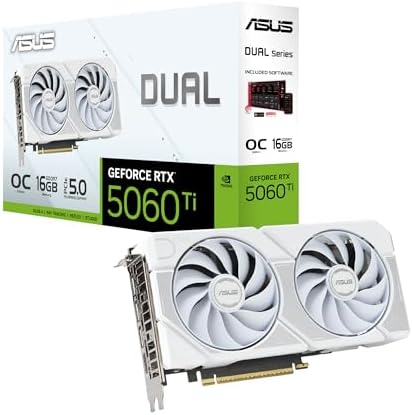
Every pick here is a genuine graphics card, so the choice comes down to tier, size and memory system: the GIGABYTE RTX 5080 is the top-tier card, the ASRock RX 9070 XT is the lone Radeon with the highest stated clock figure, and the three RTX 5060 Ti cards trade on compact designs. Two of the five are the same ASUS Dual card in white and black, so shared figures are never treated as unique to either color.
All five cards carry 16GB of memory. The GIGABYTE and the PNY state GDDR7 in their facts; the ASRock runs GDDR6 on a 256-bit bus; the two ASUS cards name GDDR7 (product name) without stating the memory type in their facts; and PCIe 5.0 is stated in the ASRock and GIGABYTE facts, named for the other three (product name). Lengths run from 9.0 to 13.46 inches and weights from 1.4 to 4.03 pounds, so clearance divides the set as sharply as tier.
As an Amazon Associate, we earn from qualifying purchases.


Pick by Your Need
- Best overall: GIGABYTE RTX 5080 Gaming OC. The only RTX 5080 here, with 16GB of GDDR7 on a 256-bit interface in its facts.
- Best for small chassis: ASUS Dual RTX 5060 Ti White. A 2.5-slot card at 9.0 inches and the lightest stated weight, 1.4 pounds.
- Best for 1440p textures: PNY RTX 5060 Ti Dual-Fan. Its facts tie its 16GB buffer and 448 GB/s bandwidth to 1440p textures.
- Best for 4K gaming: ASRock RX 9070 XT Challenger. A boost clock up to 2970 MHz and a triple-fan cooler.
- Best for AI work: ASUS Dual RTX 5060 Ti Black. Its facts state 767 AI TOPS, the only AI figure here.
Quick Answer
Start with the GIGABYTE RTX 5080 if your case fits a 13.46-inch, 4.03-pound card and you want the top tier here. Choose the ASRock RX 9070 XT for the highest stated clock figure and the set’s only GDDR6 memory, or a 9.0-inch ASUS Dual or the 9.65-inch PNY when compact size matters more than tier.
Comparison Table
| Product | GPU | Memory | Clock figure | Length | Weight | Ports | Buy |
|---|---|---|---|---|---|---|---|
| ASUS Dual RTX 5060 Ti White | RTX 5060 Ti | 16GB GDDR7 (product name) | 2632 MHz (OC mode) | 9.0 in | 1.4 lb | HDMI 2.1b, DP 2.1b (product name) | View on Amazon |
| PNY RTX 5060 Ti Dual-Fan | RTX 5060 Ti | 16GB GDDR7 | 2692 MHz boost (product name) | 9.65 in | 1.98 lb | HDMI/DP 2.1 (product name) | View on Amazon |
| ASRock RX 9070 XT Challenger | RX 9070 XT | 16GB GDDR6 | 2970 MHz boost | 11.42 in | 2.29 lb | DisplayPort 2.1a (product name) | View on Amazon |
| GIGABYTE RTX 5080 Gaming OC | RTX 5080 | 16GB GDDR7 | not stated | 13.46 in | 4.03 lb | not stated | View on Amazon |
| ASUS Dual RTX 5060 Ti Black | RTX 5060 Ti | 16GB GDDR7 (product name) | 2632 MHz (OC mode) | 9.0 in | 1.45 lb | HDMI 2.1b, DP 2.1b (product name) | View on Amazon |
Decision Guide
If your case has limited GPU clearance, start with length. The two ASUS Dual cards tie as the shortest stated at 9.0 inches, the PNY follows at 9.65 inches, the ASRock needs 11.42 inches, and the GIGABYTE needs 13.46 inches at the heaviest stated weight here, 4.03 pounds. Measure your case’s stated card limit first.
On clocks, read the bases carefully. The ASRock states a boost clock up to 2970 MHz in its facts, the ASUS cards state 2632 MHz in OC mode against 2602 MHz in default mode, and the PNY’s 2692 MHz boost rests on its product name (product name) rather than its facts. The GIGABYTE listing gives no clock figure at all, so judge it on tier, memory and size instead.
One data warning applies across the set: three spec tables list heights of 0.1, 0.1 and 0.04 inches, figures that cannot sit with these cards’ multi-slot designs, while the black ASUS states 2.0 inches and the GIGABYTE 2.76 inches. Treat the three low figures as listing errors, re-check the product page, and compare on length and weight instead.
On bandwidth, only the PNY states a figure in its facts, 448 GB/s; the ASRock and GIGABYTE state 256-bit buses without one.
1. ASUS Dual RTX 5060 Ti White — Best for small chassis
The white ASUS Dual pairs the set’s joint-shortest stated length, 9.0 inches, with the lightest stated weight, 1.4 pounds, in a 2.5-slot design its facts say maximizes compatibility in small chassis. Its facts state a 2632 MHz OC mode against a 2602 MHz default, Blackwell with DLSS 4, and Axial-tech fans. The trade-off is documentation: its memory type and port versions rest on the product name (product name), and its spec-table height is one of the three implausible figures flagged above.
| Spec | From the listing |
|---|---|
| Memory | 16GB GDDR7 (product name) |
| Length | 9.0 inches |
| Width | 4.7 inches |
| Weight | 1.4 pounds |
2. PNY RTX 5060 Ti Dual-Fan — Best for 1440p textures
The PNY is the only card whose facts put a bandwidth figure on its memory: 16GB of GDDR7 with 448 GB/s, framed for maxed-out 1440p textures, creative projects and local AI models. Its cooler pairs a dense heatsink with a vented metal backplate, and VelocityX software covers tuning, fan curves and monitoring. At 9.65 inches and 1.98 pounds it sits between the ASUS pair and the ASRock on size; the trade-off is that its boost figure of 2692 MHz (product name) and 128-bit bus rest on the product name (product name), not the facts.
| Spec | From the listing |
|---|---|
| Memory | 16GB GDDR7, 448 GB/s bandwidth |
| Clock | 2692 MHz boost (product name) |
| Length | 9.65 inches |
| Weight | 1.98 pounds |
3. ASRock RX 9070 XT Challenger — Best for 4K gaming
The ASRock is the set’s only Radeon and its only GDDR6 card, pairing 16GB on a 256-bit bus with a boost clock up to 2970 MHz, the highest clock figure stated in any listing’s facts. Its RDNA 4 architecture carries 64 compute units, third-generation ray tracing and second-generation AI accelerators, and its triple-fan cooler adds Striped Axial Fan technology. At 11.42 inches and 2.29 pounds it needs a larger case than the 5060 Ti cards; the trade-off is memory generation, GDDR6 against GDDR7.
| Spec | From the listing |
|---|---|
| Memory | 16GB GDDR6, 256-bit bus |
| Boost clock | Up to 2970 MHz |
| Length | 11.42 inches |
| Weight | 2.29 pounds |
4. GIGABYTE RTX 5080 Gaming OC — Best overall
The GIGABYTE is the only RTX 5080 in the set, a full tier above the three 5060 Ti cards and the Radeon, with 16GB of GDDR7 on a 256-bit interface stated in its facts and WINDFORCE cooling (product name). The trade-off is physical: at 13.46 inches and 4.03 pounds it is the longest and heaviest stated card here, and its listing gives no clock figure or port versions.
| Spec | From the listing |
|---|---|
| Memory | 16GB GDDR7, 256-bit interface |
| Dimensions | 13.46 x 5.59 x 2.76 inches |
| Weight | 4.03 pounds |
| Interface | PCIe 5.0 |
5. ASUS Dual RTX 5060 Ti Black — Best for AI work
The black ASUS Dual shares its twin’s stated length of 9.0 inches, 2.5-slot design (product name), Axial-tech fans and 2632 MHz OC mode against a 2602 MHz default, and adds the figure its sibling’s facts omit: 767 AI TOPS. Its spec table states a 2.0-inch height, the plausible figure the white edition lacks, at 1.45 pounds against the white card’s 1.4. The trade-off mirrors its twin: the GDDR7 memory type and HDMI 2.1b and DisplayPort 2.1b port versions rest on the product name (product name), so confirm them on the product page.
| Spec | From the listing |
|---|---|
| Memory | 16GB GDDR7 (product name) |
| Length | 9.0 inches |
| Width | 4.7 inches |
| Weight | 1.45 pounds |
Shopping Checklist
- Measure your case’s stated graphics card clearance first: stated lengths here run from 9.0 to 13.46 inches.
- Ignore the three implausible spec-table height figures (0.1, 0.1 and 0.04 inches); re-check the product page for slot clearance.
- Confirm your motherboard offers a PCIe slot and your power supply covers the card; the listings give no wattage figures.
- Verify port versions on the product page where they rest on a product name (product name), and confirm the GIGABYTE’s ports there, since its listing gives none.
- Check the return window on the product page, and compare finalists on tier, memory type and length.
FAQ
How do I choose between an RTX 5060 Ti and a higher-tier card?
Compare GPU tier first, then physical fit. The RTX 5080 sits a tier above the 5060 Ti cards, but it is also the longest and heaviest stated card, so a case that fits a 9.0-inch card may rule it out first.
Does the memory type matter when every card has 16GB?
Yes, because capacity is only one part of the memory system. The listings split between GDDR7 and the ASRock’s GDDR6, with bus widths of 256-bit stated in two listings and 128-bit (product name) for the PNY, so compare the full memory specification.
What should I check before ordering a graphics card?
Check stated card length against your case’s clearance, slot design against your motherboard layout, and port versions against your monitor’s inputs. Where a figure rests on a product name or conflicts with the design, confirm it on the product page first.
Final Verdict
The GIGABYTE RTX 5080 is the pick when your case fits it: the highest tier here, with GDDR7 on a 256-bit interface stated in its facts. The ASRock RX 9070 XT is the strongest alternative, with the highest stated clock figure and a triple-fan cooler on GDDR6. For compact builds, the two 9.0-inch ASUS Dual cards and the 9.65-inch PNY cover the 5060 Ti tier at the lightest stated weights.
Prime covers fast, free delivery on eligible items. See whether a Prime free trial is available for your account.
Check Prime on Amazon →Product and ASIN Reference
| Product | ASIN | Buy |
|---|---|---|
| ASUS Dual RTX 5060 Ti White | B0G1FVLWSG | View on Amazon |
| PNY RTX 5060 Ti Dual-Fan | B0F4Y6N6PW | View on Amazon |
| ASRock RX 9070 XT Challenger | B0FSSYTD49 | View on Amazon |
| GIGABYTE RTX 5080 Gaming OC | B0DS2R6948 | View on Amazon |
| ASUS Dual RTX 5060 Ti Black | B0F7WB6LSH | View on Amazon |
Types of Graphics Cards
Graphics cards are grouped mainly by chip tier and by manufacturer brand (a given GPU chip is sold by multiple board partners with different coolers and clock speeds). Higher-tier chips generally handle higher resolutions and settings; lower-tier chips suit 1080p or lower settings at a lower price.
Two cards built on the same GPU chip from different board partners can still differ in cooling, noise, and factory clock speed, so the specific card model matters beyond just the chip name alone.
Frequently Asked Questions
Does buying a specific brand's version of a GPU chip matter?
Yes to some degree -- board partners vary cooling design, noise level, and factory clock speed even when using the same underlying GPU chip, so two cards with the same chip name can still perform and sound differently.
What's the practical difference between competing GPU brands at a similar price?
Performance in a given game can favor one brand over another depending on how well that title is optimized for each architecture, so checking reviews for the specific games you play matters more than brand reputation alone.







Write Your Review
No reviews yet. Be the first to share your experience!