
If you carry a 16-inch MacBook Pro, the ProCase sleeve is the pick that fits it with a front pocket for a charger and cables, while the 0.37-pound AREYLO sleeve is the lightest option for 15.6-inch laptops. The five sleeves in this guide cover 13-inch, 14-inch, 15-inch and 16-inch machines, and the right one depends on the size of your laptop first and the pocket layout second. Every sleeve here is built to slide into a backpack, a briefcase or a suitcase, so the choice comes down to measurements rather than looks.
The measurements matter because a sleeve that is too small will not close around the laptop, and a sleeve that is too large lets the laptop shift inside it. Two listings in this set give conflicting dimensions between their facts and their spec tables, and both conflicts are flagged in the product sections below so you can check the product page before you order. Measure your laptop first, then match the interior dimensions of the sleeve to it.
As an Amazon Associate, we earn from qualifying purchases.


Pick by Your Need
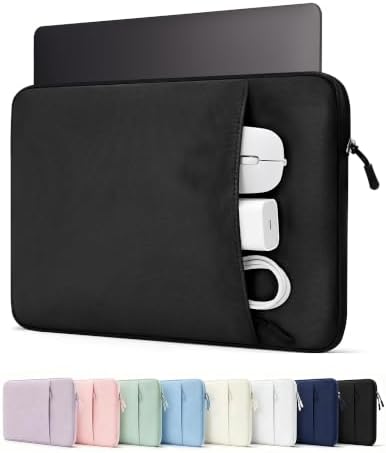
- Best overall: ProCase 16-Inch Sleeve. It fits 16-inch MacBook Pro models and adds a front pocket for a charger, a power bank and cables.
- Best for 13-inch and 14-inch laptops: Comfyable Slim Sleeve. It measures 14.57 by 10.24 by 0.79 inches and weighs 0.53 pounds.
- Best lightest: AREYLO 15.6-Inch Sleeve. It weighs 0.37 pounds, the lightest in this set.
- Best thinnest: Allinside 15-16 Inch Sleeve. Its spec table gives a thickness of 0.39 inches.
- Best for a 13-inch fit with a big pocket: BAGSMART 13-14 Inch Sleeve. Its front pocket measures 10 by 10 inches.
Quick Answer
Choose the ProCase sleeve for a 16-inch MacBook Pro, because it is the only sleeve here with interior dimensions of 14.37 by 10.63 by 0.98 inches and a front pocket for a full set of accessories. Choose the AREYLO sleeve for a 15.6-inch laptop when weight matters most, at 0.37 pounds, and choose the Comfyable sleeve for a 13-inch or 14-inch MacBook, at 0.53 pounds with a water-resistant PU exterior.
Comparison Table
| Product | Best for | Fits | Dimensions (inches) | Trade-off | Buy |
|---|---|---|---|---|---|
| ProCase 16-Inch Sleeve | 16-inch MacBook Pro | 16-inch | 14.37 x 10.63 x 0.98 (interior) | Largest footprint in this set; no weight given | View on Amazon |
| Comfyable Slim Sleeve | 13-inch and 14-inch MacBook | 13.3-14 inch | 14.57 x 10.24 x 0.79 | Fits only 13-inch and 14-inch machines | View on Amazon |
| BAGSMART 13-14 Inch Sleeve | 13-inch fit with a big pocket | 13-13.3 inch | 13.8 x 10.5 x 1.4 (spec table) | Dimensions conflict between facts and spec table | |
| Allinside 15-16 Inch Sleeve | Thinnest carry | 15.6 inch | 15.16 x 10.83 x 0.39 (spec table) | Dimensions conflict between facts and spec table | View on Amazon |
| AREYLO 15.6-Inch Sleeve | Lightest carry | 15.6 inch | 15.5 x 11 x 0.8 (exterior) | Basic protection rather than thick padding | View on Amazon |
Decision Guide: Match the Sleeve to Your Laptop First
Start with the laptop, not the sleeve. Measure the length, width and thickness of your laptop, then compare those numbers with the interior dimensions of the sleeve. The ProCase sleeve is the pick for a 16-inch MacBook Pro, with an interior of 14.37 by 10.63 by 0.98 inches. The Comfyable sleeve is the pick for a 13-inch MacBook Air or a 14-inch MacBook Pro, with an interior of 14.57 by 10.24 by 0.79 inches. The AREYLO sleeve is the pick for a 15.6-inch laptop, with an interior of 15.2 by 10.8 by 0.7 inches.
Next, decide how much you carry with the laptop. The ProCase sleeve has a front pocket for a charger, a power bank, USB cables, a docking hub and a mouse. The BAGSMART sleeve has a front pocket of 10 by 10 inches for a charger, a mouse, cables, a phone, memory cards and an external hard drive. The AREYLO sleeve has a front pocket for a charger and small accessories. The Comfyable and Allinside listings name no front pocket, so a charger and cables need a separate bag with those two.
Then weigh thickness and weight against each other. The Allinside sleeve is the thinnest in this set at 0.39 inches in its spec table, and the AREYLO sleeve is the lightest at 0.37 pounds. The Comfyable sleeve sits in the middle at 0.79 inches thick and 0.53 pounds, while the BAGSMART sleeve is the heaviest at 0.44 pounds among the four with a stated weight. The ProCase listing gives no weight figure, so its carry weight cannot be compared with the others.
Finally, check the closure and the material. The Allinside sleeve uses a magnetic closure that holds the laptop in place while letting it slide out, and the other four use zippers, with the BAGSMART and AREYLO sleeves using top-loading zippers. The Comfyable sleeve uses a water-resistant PU exterior, the BAGSMART sleeve uses water-resistant polyester, the Allinside sleeve uses water-resistant PU leather, and the AREYLO sleeve uses neoprene. If two listings in this set conflict on dimensions, check the product page for the measurements that apply to the unit you order, because the BAGSMART and Allinside listings give different numbers in their facts and their spec tables.
1. ProCase 16-Inch MacBook Pro Sleeve — Best overall
The ProCase sleeve fits 16-inch MacBook Pro models, with internal dimensions of 14.37 by 10.63 by 0.98 inches, and its front pocket holds a charger, a power bank, USB cables, a docking hub and a mouse. Thick shock-absorbing padding and a plush lining sit between the laptop and the outside of the sleeve. The trade-off is size: at 14.37 inches long and 10.63 inches wide, it has the largest interior in this set, and the listing gives no weight figure, so the carry weight cannot be compared with the 0.37-pound AREYLO or the 0.53-pound Comfyable. Skip it if your laptop is 13 or 14 inches, because the 16-inch interior leaves a smaller machine with room to move.
| Spec | From the listing |
|---|---|
| Color | Black |
| Size | 16-inch |
| Length | 14.37 inches |
| Width | 10.63 inches |
| Height | 0.98 inches |
| Front pocket | Yes, for charger, power bank, cables, hub and mouse |
2. Comfyable Slim Protective Laptop Sleeve — Best for 13-inch and 14-inch laptops
The Comfyable sleeve fits 13-inch MacBook Air models and 14-inch MacBook Pro models, with interior dimensions of 14.57 by 10.24 by 0.79 inches and a weight of 0.53 pounds. EPE foam padding sits behind a water-resistant PU exterior, and a neoprene flap inside the top stops the zipper from touching the laptop. The trade-off is the fit range: a 15-inch or 16-inch laptop does not fit inside a sleeve built for 13-inch and 14-inch machines, and the listing names no front pocket for a charger or cables.
| Spec | From the listing |
|---|---|
| Color | Brown |
| Size | For 13.3″-14″ MacBook Pro / MacBook Air |
| Length | 14.57 inches |
| Width | 10.24 inches |
| Height | 0.79 inches |
| Weight | 0.53 pounds |
3. BAGSMART Lightweight Laptop Sleeve — Best for a 13-inch fit with a big pocket
The BAGSMART sleeve fits 13-inch to 13.3-inch laptops, with a front pocket that measures 10 by 10 inches for a charger, a mouse, cables, a phone, memory cards and an external hard drive. Three layers — a waterproof layer, a shockproof layer and a fluffy inner layer — sit inside a water-resistant polyester shell, and a double-way zipper opens from the top. The trade-off is a conflict in the numbers: the listing facts give dimensions of 13.8 by 0.8 by 10 inches, while the spec table gives 13.8 by 10.5 by 1.4 inches, so check the product page for the measurements that apply before you order. At 0.44 pounds it is the second-lightest sleeve here, behind only the 0.37-pound AREYLO.
| Spec | From the listing |
|---|---|
| Color | Baby Pink |
| Size | 13-13.3 Inch |
| Length | 13.8 inches |
| Width | 10.5 inches |
| Height | 1.4 inches |
| Weight | 0.44 pounds |
4. Allinside 15-16 Inch Laptop Sleeve — Best thinnest
The Allinside sleeve fits 15-inch and 16-inch MacBook Pro models, with internal dimensions of 14.57 by 10.43 inches and a magnetic closure that holds the laptop in place while letting it slide out. Water-resistant PU leather covers the outside, and at 0.39 inches thick in the spec table it is the thinnest sleeve in this set. The trade-off is another conflict in the numbers: the listing facts give external dimensions of 15.35 by 11.02 by 0.2 inches, while the spec table gives 15.16 by 10.83 by 0.39 inches, so check the product page for the measurements that apply. The listing also names no front pocket, so a charger and cables need a separate bag.
| Spec | From the listing |
|---|---|
| Color | Gray |
| Size | 15.6 in for Macbook Pro15/Pro 16 |
| Length | 15.16 inches |
| Width | 10.83 inches |
| Height | 0.39 inches |
| Weight | 0.6 pounds |
5. AREYLO 15.6-Inch Laptop Sleeve — Best lightest
The AREYLO sleeve fits 15.6-inch laptops, with external dimensions of 15.5 by 11 by 0.8 inches, internal dimensions of 15.2 by 10.8 by 0.7 inches, and a weight of 0.37 pounds, the lightest in this set. Neoprene covers the outside, a front pocket holds a charger and small accessories, and a top-loaded zipper opens the main compartment. The trade-off is protection: the listing describes basic laptop protection rather than the thick shock-absorbing padding named for the ProCase, and the 0.8-inch external thickness leaves less room than the 1.4-inch BAGSMART spec-table figure. Skip it if you want the thickest padding in this set, because the listing describes basic protection rather than the shock-absorbing padding named for the ProCase.
| Spec | From the listing |
|---|---|
| Color | Black |
| Size | 15.6 Inch |
| Length | 15.5 inches |
| Width | 11.0 inches |
| Height | 0.8 inches |
| Weight | 0.37 pounds |
Buying Checklist
- Measure your laptop first: length, width and thickness, then compare with the interior dimensions of the sleeve.
- Check whether the sleeve has a front pocket, and whether the pocket is large enough for your charger and cables.
- Check the stated thickness and weight of the sleeve, and whether the listing gives both figures.
- Check the material and the closure type: PU, polyester, neoprene or PU leather, and zipper or magnetic closure.
- Check the return window on the product page before you order, so a sleeve that does not fit can go back.
- Compare 2-3 finalists side by side on fit, pocket space, thickness and weight.
FAQ
What size sleeve should I buy for a 16-inch laptop?
Buy a sleeve with an interior that matches a 16-inch machine, such as the ProCase sleeve with an interior of 14.37 by 10.63 by 0.98 inches. A sleeve built for 13-inch or 14-inch laptops will not close around a 16-inch machine. Measure your laptop first and compare its length, width and thickness with the interior dimensions in the listing.
Do I need a front pocket on a travel sleeve?
A front pocket matters when you carry a charger, a mouse and cables with the laptop, because it keeps them out of the main compartment. The ProCase sleeve has a front pocket for a charger, a power bank, USB cables, a docking hub and a mouse, and the BAGSMART sleeve has a front pocket of 10 by 10 inches. If you carry the laptop alone, a sleeve without a front pocket, such as the Comfyable or Allinside, still works.
How do I check the fit before ordering?
Compare the interior dimensions in the listing with the length, width and thickness of your laptop, and confirm the size the listing names, such as 13-inch, 14-inch, 15.6-inch or 16-inch. Two listings in this set give conflicting dimensions between their facts and their spec tables, so check the product page for the measurements that apply when the numbers disagree. When the interior is close to the laptop size, confirm the return window on the product page before you order.
Final Verdict
The ProCase sleeve is the pick for a 16-inch MacBook Pro, because it is the only sleeve here with a 16-inch interior and a front pocket for a full set of accessories. The AREYLO sleeve is the pick for a 15.6-inch laptop when weight matters most, at 0.37 pounds with a front pocket included. The Comfyable sleeve is the pick for a 13-inch or 14-inch MacBook, at 0.53 pounds with a water-resistant PU exterior and a neoprene flap. Whichever size you need, measure your laptop first and check the product page when a listing gives conflicting dimensions.
Prime covers fast, free delivery on eligible items. See whether a Prime free trial is available for your account.
Check Prime on Amazon →Related Guides
No related guides were listed for this post, so no internal links appear here.







Write Your Review
No reviews yet. Be the first to share your experience!