
For everyday color printing at home, the HP DeskJet 2923 covers the basics, while heavier document loads point to the Brother monochrome laser or the HP OfficeJet Pro 8125. The five models in this guide all print, scan and copy, yet they split clearly on speed, paper handling and color. Two Canon all-in-ones share almost the same listed features and measurements, so the choice between them comes down to the display and the way each model is presented. The rest of this guide lines up the stated speeds, tray sizes, dimensions and weights so you can match a model to the work you actually print.
We compared the listing details for each model rather than guessing at performance, and every section below gives the stated figures, three strengths drawn from the listing, two drawbacks and a short spec table. Begin with the quick picks, then use the comparison table and decision guide to narrow the field to one or two finalists before reading the full sections.
As an Amazon Associate, we earn from qualifying purchases.



Pick by Your Need
- Best overall: HP OfficeJet Pro 8125. It pairs the fastest stated color speed here, 10 ppm, with a 225-sheet tray, an automatic document feeder and duplex printing.
- Best for basic home color printing: HP DeskJet 2923. It is the lightest model in the group at 7.55 pounds and handles everyday color documents with print, scan and copy.
- Best with an on-printer display: Canon PIXMA TS6520. Its 1.42-inch OLED display and intuitive control panel set it apart from the other Canon model.
- Best for home photo printing: Canon PIXMA TS4320. Its listing presents it as a photo printer, copier and scanner with a 2-cartridge hybrid ink system.
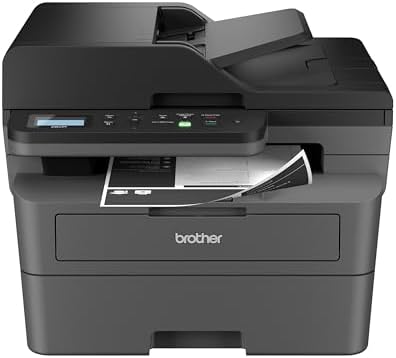
- Best for fast monochrome documents: Brother DCP-L2640DW. It prints at up to 36 ppm and adds a 50-page automatic document feeder.
Quick Answer
Choose the HP OfficeJet Pro 8125 for a home office that prints color documents in volume, and the Brother DCP-L2640DW when documents are monochrome and speed matters most. For light home use, the HP DeskJet 2923 covers everyday color printing at the lowest stated weight, while the two Canon models suit households that want photo printing with automatic 2-sided printing.
Comparison Table
| Printer | Best for | Print speed | Paper handling | Weight | Buy |
|---|---|---|---|---|---|
| HP DeskJet 2923 | Basic home color printing | Up to 7.5 ppm black, 5.5 ppm color | 60-sheet input tray | 7.55 pounds | View on Amazon |
| Canon PIXMA TS6520 | On-printer display | — | — | 15.42 pounds | View on Amazon |
| Canon PIXMA TS4320 | Home photo printing | — | — | 15.46 pounds | View on Amazon |
| Brother DCP-L2640DW | Fast monochrome documents | Up to 36 ppm | 50-page automatic document feeder | 25.0 pounds | View on Amazon |
| HP OfficeJet Pro 8125 | Home office color work | Up to 20 ppm black, 10 ppm color | 225-sheet input tray, automatic document feeder | 17.6 pounds | View on Amazon |
Decision Guide
If you print mostly in color at home, begin with the inkjets. Four of the five models print in color, and the split among them is speed and paper handling rather than color itself. The DeskJet 2923 prints at up to 7.5 ppm black and 5.5 ppm color with a 60-sheet tray, which fits short runs of letters, recipes and to-do lists. The OfficeJet Pro 8125 prints at up to 20 ppm black and 10 ppm color with a 225-sheet tray, so it handles longer color jobs with fewer refills. The two Canon models sit between those poles on features, so weigh their display and photo framing instead of speed.
If your documents are monochrome and frequent, the Brother laser is the clear direction. At up to 36 ppm it carries the fastest stated speed in this group by a wide margin, and its scan speeds of up to 23.6 ipm in black and 7.9 ipm in color back up the 50-page automatic document feeder. The trade is absolute: it prints in black and white only, so any color page in your regular work rules it out. It is also the heaviest model at 25.0 pounds and the tallest at 12.5 inches high, so plan a roomy spot for it.
If you scan or copy multi-page stacks, the feeder decides the pick. The Brother lists a 50-page automatic document feeder, and the OfficeJet Pro 8125 lists an automatic document feeder alongside its 225-sheet tray. Multi-page scanning and copying on the other three models need manual page handling, because the Brother and the OfficeJet Pro 8125 are the only two listings here that describe an automatic document feeder. The two Canon models describe an integrated scanner for scanning and copying, and the DeskJet lists scan and copy among its functions. When multi-page scanning is a weekly task rather than a rare one, that difference matters more than any other single feature in this group.
If desk space is tight, measure against the stated dimensions before anything else. The DeskJet 2923 is the smallest at 16.73 inches wide, 11.97 inches deep and 6.06 inches high, and the lightest at 7.55 pounds. The Canon models are deeper at 14.8 inches and weigh just over 15 pounds each, while the OfficeJet Pro 8125 is the widest at 18.11 inches. Check the depth figure rather than the width alone, since the Canon models run 14.8 inches deep against 11.97 inches for the DeskJet.
If you want the most control on the printer itself, compare the displays. The OfficeJet Pro 8125 lists a 2.7-inch touchscreen with a phone-like interface, the largest stated display in the group. The Canon TS6520 lists a 1.42-inch OLED display with an intuitive control panel. The DeskJet 2923 lists an Icon LCD. The Brother listing covers control through the Brother Mobile Connect app, which prints, scans and manages the printer from a mobile device, and the Canon TS4320 listing covers easy setup for a smartphone or computer.
Product Sections
1. HP DeskJet 2923 Color Inkjet — Best for Basic Home Color Printing
The lightest printer in this group, this HP all-in-one is built around everyday color documents such as to-do lists, letters, financial documents and recipes. It prints at up to 7.5 ppm in black and 5.5 ppm in color, which trails the 20 ppm black of the OfficeJet Pro 8125 and the 36 ppm of the Brother laser by a wide margin, and its 60-sheet input tray is the smallest stated tray here next to the 225-sheet tray on the OfficeJet Pro. Dual-band Wi-Fi automatically detects and resolves connection issues, and HP AI trims web pages and emails so unwanted content does not reach the page. At 16.73 inches wide, 11.97 inches deep and 6.06 inches high, with a weight of 7.55 pounds, it is also the smallest and lightest of the five. Skip it if you print long documents every day, since 7.5 ppm black is the slowest stated speed in this group.
| Spec | From the listing |
|---|---|
| Functions | Print, scan, copy |
| Print speed | Up to 7.5 ppm black, 5.5 ppm color |
| Input tray | 60 sheets |
| Display | Icon LCD |
| Dimensions | 16.73 x 11.97 x 6.06 inches |
| Weight | 7.55 pounds |
2. Canon PIXMA TS6520 With OLED Display — Best With an On-Printer Display
The standout feature here is the 1.42-inch OLED display paired with an intuitive control panel, the only OLED display among the five, and the OfficeJet Pro answers with a larger 2.7-inch touchscreen. Its 2-cartridge hybrid ink system is listed for sharp text and vivid colors in documents and photos, and automatic 2-sided printing cuts paper use while dual-band Wi-Fi covers 2.4 GHz and 5 GHz. The trade-off is weight and sameness: at 15.42 pounds it weighs roughly twice as much as the 7.55-pound DeskJet 2923, and nearly every listed feature matches the TS4320 line for line, so the display is doing most of the work in setting this model apart. Setup covers a smartphone or computer, and the integrated scanner handles scanning and copying.
| Spec | From the listing |
|---|---|
| Display | 1.42-inch OLED |
| Functions | Print, scan, copy |
| Ink system | 2-cartridge hybrid |
| Duplex | Automatic 2-sided printing |
| Dimensions | 14.8 x 14.0 x 6.7 inches |
| Weight | 15.42 pounds |
3. Canon PIXMA TS4320 Photo All-in-One — Best for Home Photo Printing
This Canon model is presented in its listing as a photo printer, copier and scanner for home use, and that framing is the clearest stated difference from the TS6520, which leads with its 1.42-inch OLED display instead. The two models share the same listed dimensions, 14.8 inches long, 14.0 inches wide and 6.7 inches high, the same dual-band Wi-Fi, the same 2-cartridge hybrid ink system and the same automatic 2-sided printing. The only stated dimension or weight figure that differs is weight: this model lists 15.46 pounds against 15.42 pounds for the TS6520, a gap of 0.04 pounds. The trade-off is that little else separates the two on the listing details, so the decision turns on whether the display or the photo-printer framing matters more to you, and its integrated scanner handles multi-page copying one page at a time. Its listing describes an integrated scanner for scanning and copying.
| Spec | From the listing |
|---|---|
| Functions | Print, scan, copy |
| Ink system | 2-cartridge hybrid |
| Duplex | Automatic 2-sided printing |
| Display | The listing does not state it |
| Dimensions | 14.8 x 14.0 x 6.7 inches |
| Weight | 15.46 pounds |
4. Brother DCP-L2640DW Monochrome Laser — Best for Fast Monochrome Documents
When documents are monochrome and volume is high, this Brother laser stands apart from the four inkjets: it prints at up to 36 ppm, against 20 ppm black for the OfficeJet Pro 8125 and 7.5 ppm for the DeskJet 2923, and it scans at up to 23.6 ipm in black and 7.9 ipm in color. A 50-page automatic document feeder handles multi-page scanning and copying — one of two feeders in the group, the other listed for the OfficeJet Pro 8125 alongside its 225-sheet tray — and connectivity covers dual-band wireless, Ethernet and USB, where the other four list wireless only. It measures 15.7 inches long, 16.1 inches wide and 12.5 inches high and weighs 25.0 pounds, making it the heaviest and tallest model here. Skip it if any of your regular printing needs color, because this model prints in black and white only.
| Spec | From the listing |
|---|---|
| Print speed | Up to 36 ppm |
| Scan speed | Up to 23.6 ipm black, 7.9 ipm color |
| Auto document feeder | 50 pages |
| Connectivity | Dual-band wireless, Ethernet, USB |
| Dimensions | 15.7 x 16.1 x 12.5 inches |
| Weight | 25.0 pounds |
5. HP OfficeJet Pro 8125 Home Office — Best for Home Office Color Work
The strongest all-round color option in this group, this HP model prints at up to 20 ppm in black and 10 ppm in color, the fastest color speed stated here, and pairs that with a 225-sheet input tray that holds nearly four times the 60 sheets of the DeskJet 2923. An automatic document feeder and automatic 2-sided printing cover multi-page jobs, a 2.7-inch touchscreen gives the largest stated display in the group, and the HP App handles printing, scanning, copying and fax from a smartphone. Dual-band Wi-Fi automatically detects and resolves connection issues, and a 3-month trial of Instant Ink is included, with a monthly fee applying after that period unless cancelled. The trade-off is size: at 18.11 inches wide and 17.6 pounds it needs the widest desk space of the five.
| Spec | From the listing |
|---|---|
| Print speed | Up to 20 ppm black, 10 ppm color |
| Input tray | 225 sheets |
| Display | 2.7-inch touchscreen |
| Functions | Print, scan, copy; fax through the HP App |
| Dimensions | 18.11 x 13.29 x 9.17 inches |
| Weight | 17.6 pounds |
Buying Checklist
- Measure the desk or shelf against the stated dimensions, including depth — the Canon models run 14.8 inches deep against 11.97 inches for the DeskJet.
- Decide color against monochrome first, since the fastest stated model here prints in black and white only.
- Match the tray and feeder to how much you print in one sitting, from a 60-sheet tray to a 225-sheet tray or a 50-page feeder.
- Check connectivity against your setup: dual-band Wi-Fi on all five, plus Ethernet and USB on the Brother model.
- Compare two or three finalists side by side on speed, tray size and footprint, and check the return window on the product page.
FAQ
Which printer is the right pick for everyday color documents at home?
For light use, the DeskJet 2923 covers everyday color documents at up to 7.5 ppm black and 5.5 ppm color with a 60-sheet tray. When color printing runs longer or more often, the OfficeJet Pro 8125 steps up to 20 ppm black, 10 ppm color and a 225-sheet tray. Both print, scan and copy, so the choice turns on volume rather than functions.
Do I need a printer with an automatic document feeder?
A feeder matters when you scan or copy multi-page stacks often, since it moves pages through without manual handling. The Brother lists a 50-page feeder, and the OfficeJet Pro 8125 lists a feeder alongside its 225-sheet tray. The other three models move multi-page stacks through by hand, page by page.
How do I choose between the two Canon models?
The two Canon models share the same stated dimensions, dual-band Wi-Fi, 2-cartridge hybrid ink system and automatic 2-sided printing, with weights of 15.42 and 15.46 pounds. The TS6520 lists a 1.42-inch OLED display with an intuitive control panel, while the TS4320 is presented as a photo printer, copier and scanner. Pick the TS6520 for the display, or the TS4320 for the photo-printer framing.
Final Verdict
The OfficeJet Pro 8125 is the strongest all-round pick for a home office, with the fastest stated color speed, the largest stated tray and a feeder. The Brother laser takes the monochrome workload at up to 36 ppm with a 50-page feeder, provided color is never needed. For light home printing, the DeskJet 2923 does the job at the lowest stated weight, and the two Canon models cover photo printing, separated mainly by the TS6520 display.
Prime covers fast, free delivery on eligible items. See whether a Prime free trial is available for your account.
Check Prime on Amazon →Related Guides
 Best Akko Mechanical Keyboard Guide: 5 Picks ComparedCompare five Akko mechanical keyboards for full-size, low-profile, rapid-trigger, wood-case and tri-mode use, with…Read next →
 Best Wireless Keyboard Low Profile: 5 Compared for YouCompare five low-profile wireless keyboards on size, battery life, layout, and connectivity, including two…Read next →
 Best OLED Gaming Monitor: 5 Sharp, Fast Picks ComparedCompare five OLED gaming monitors from Samsung, ASUS, and Alienware, with QHD and 4K…Read next →



Write Your Review
No reviews yet. Be the first to share your experience!