
Pick a VESA arm mount such as the VIVO or the MOUNT PRO if you want two screens held off the desk surface with tilt, swivel and rotation, and pick a wide riser shelf such as the gianotter, BONTEC or WESTREE if you want both monitors on a raised platform with storage underneath. All five listings here state support for two monitors, so the real choice is mounting style, footprint and storage below the screens.
The arm mounts free the desk surface because the screens attach to a pole and base, while the risers turn the area under the shelf into storage. Screen size limits, load limits and base measurements differ enough that checking those stated figures first will narrow the field quickly.
As an Amazon Associate, we earn from qualifying purchases.
Pick by Your Need
- Best overall: VIVO Dual Monitor Mount. It holds two 13 to 27 inch screens at up to 22 pounds, with full tilt, swivel and rotation.
- Best for full motion: MOUNT PRO Dual Monitor Stand. Each arm holds up to 17.6 pounds and height adjusts up to 17.6 inches.
- Best with a drawer: gianotter Dual Monitor Stand Riser. A 40.6 inch shelf adds a drawer and two pen holders, with no assembly stated.
- Best adjustable width: BONTEC Dual Monitor Stand Riser. It expands from 31.5 to 42.5 inches and the side shelves swivel for corner layouts.
- Best wide wood shelf: WESTREE Dual Monitor Stand Riser. A 35.8 inch wood and steel shelf with anti-slip pads stated on the bottom.
Quick Answer
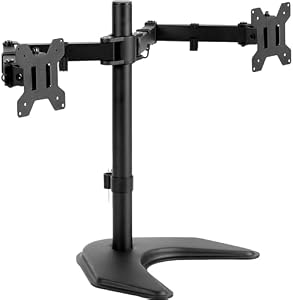
For most two-screen desks, the VIVO mount is the starting point because it states the highest load figure here at up to 22 pounds and covers 13 to 27 inch screens on a 13 by 10.5 inch base. Choose the MOUNT PRO for the same arm style with height adjustment stated up to 17.6 inches, and the gianotter riser if a drawer and zero assembly matter more than moving the screens on arms.
Comparison Table
| Product | Best for | Key stated figure | Trade-off |
|---|---|---|---|
| VIVO Dual Monitor Mount | Two VESA screens on arms | Screens 13 to 27 inches, up to 22 lbs | Needs 75x75mm or 100x100mm mounting holes |
| gianotter Dual Monitor Stand Riser | Shelf storage with a drawer | 40.6 inches long, 6.8 pounds | No stated screen size or load limit |
| BONTEC Dual Monitor Stand Riser | Adjustable-width corner layouts | Expandable 31.5 to 42.5 inches | No stated load or screen size limit |
| WESTREE Dual Monitor Stand Riser | A long wood and steel shelf | 35.8 inches long, 9.02 pounds | Fixed width, no stated adjustment |
| MOUNT PRO Dual Monitor Stand | Full-motion arms, taller lift | Up to 17.6 lbs per arm, height to 17.6 inches | Lower per-arm load figure than the VIVO |
Decision Guide
If you need each screen to tilt, swivel and rotate independently, choose an arm mount, because the riser shelves hold monitors at a fixed height. Between the mounts, the VIVO states up to 22 pounds and a 13 by 10.5 inch base, while the MOUNT PRO states 17.6 pounds per arm and height adjustment up to 17.6 inches, so the VIVO suits the heavier stated load and the MOUNT PRO the taller lift.
If you need storage built in, choose the gianotter for its drawer and two magnetic pen holders, or the BONTEC for its 3 open compartments and phone holder slot. For a corner layout, the BONTEC is the only listing here that states swivel side shelves, across a 31.5 to 42.5 inch span.
If you need the longest fixed shelf, compare the gianotter at 40.6 inches long against the WESTREE at 35.8 inches long and 10.2 inches wide; the WESTREE is wider by stated width and the heaviest of the five at 9.02 pounds. If your monitors lack VESA holes, the risers are the fit here, because both mounts state a 75x75mm or 100x100mm pattern as a requirement. Check the product page for current details before ordering.
1. VIVO Dual Monitor Mount — Best overall
The VIVO is a freestanding arm mount for two screens from 13 to 27 inches, with a stated load figure of up to 22 pounds and VESA patterns of 75x75mm or 100x100mm. Its arms offer tilt from +90 to -90 degrees, 180 degree swivel and 360 degree rotation, plus height adjustment along the center pole, which no riser shelf states. The base measures 13 by 10.5 inches with padding stated on its bottom, and detachable cable clips run along the arms.
Pros
- Highest stated load figure of the five listings, at up to 22 pounds
- Full stated motion: +90 to -90 degree tilt, 180 degree swivel, 360 degree rotation
- Detachable VESA plates and cable clips stated in the listing
Cons
- Monitors without 75x75mm or 100x100mm backside holes cannot mount to it
- Assembly is required before use
| Spec | From the listing |
|---|---|
| Color | Black |
| Screen size | 13 to 27 inch screens |
| Length | 17.5 inches |
| Width | 11.4 inches |
| Height | 3.8 inches |
| Weight | 4.48 pounds |
2. gianotter Dual Monitor Stand Riser With Drawer — Best with a drawer
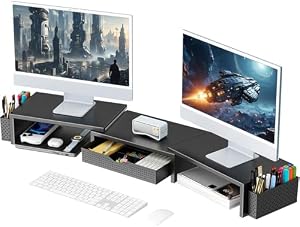
The gianotter takes the opposite approach: a 40.6 inch long, 9.3 inch wide shelf that raises both monitors to a stated height of 4.3 inches, with a drawer and two magnetic pen holders built in. The listing states no assembly is required, which separates it from both arm mounts. The space underneath is stated as usable for a mouse or keyboard, and at 6.8 pounds it is lighter than the BONTEC and WESTREE risers.
Pros
- Only listing here with a drawer and two magnetic pen holders
- States no assembly required
- Longest fixed shelf of the five at 40.6 inches long
Cons
- No screen size limit or load limit is stated for the two monitors
- Fixed 4.3 inch shelf height with no stated adjustment
| Spec | From the listing |
|---|---|
| Color | Black |
| Length | 40.6 inches |
| Width | 9.3 inches |
| Height | 4.3 inches |
| Weight | 6.8 pounds |
3. BONTEC Dual Monitor Stand Riser White — Best adjustable width

The BONTEC is the only riser here whose width changes: its expandable design runs from 31.5 to 42.5 inches, and the swivel side shelves support straight, angled or corner layouts. It adds 3 open storage compartments, plus a phone holder slot and a cable management opening, a storage count no other riser states. At 7.28 pounds it sits between the gianotter and the WESTREE at 9.02 pounds, and its white finish is the only non-black, non-brown option among the five.
Pros
- Only listing with an adjustable width, at 31.5 to 42.5 inches
- Swivel side shelves stated for straight, angled or corner layouts
- 3 open compartments plus a phone holder slot stated
Cons
- No load limit or supported screen size range is stated
- No fixed dimensions are stated outside the adjustable range
| Spec | From the listing |
|---|---|
| Color | White |
| Size | 42.5 in |
| Adjustable length | 31.5 to 42.5 inches |
| Weight | 7.28 pounds |
| Load limit | The listing does not state it |
| Screen size range | The listing does not state it |
4. WESTREE Dual Monitor Stand Riser Rustic Brown — Best wide wood shelf

The WESTREE is a fixed wood and steel riser measuring 35.8 inches long, 10.2 inches wide and 4.92 inches high, the tallest shelf of the three risers, above the gianotter at 4.3 inches. The listing states thick solid steel legs and anti-slip pads on the bottom, and the shelf also serves as a stand for a laptop, printer or TV. At 9.02 pounds it is the heaviest of the five, and its rustic brown finish is the only wood-tone option here.
Pros
- Tallest riser shelf of the three, at 4.92 inches high
- Steel legs and anti-slip pads stated in the listing
- Stated as usable for a monitor, laptop, printer or TV
Cons
- Fixed 35.8 inch width with no stated adjustment for corner layouts
- Heaviest of the five listings at 9.02 pounds
Skip it if your desk needs an angled corner layout, because no swivel or adjustable width is stated.
| Spec | From the listing |
|---|---|
| Color | Rustic Brown |
| Size | Large |
| Length | 35.8 inches |
| Width | 10.2 inches |
| Height | 4.92 inches |
| Weight | 9.02 pounds |
5. MOUNT PRO Dual Monitor Stand Free-Standing — Best for full motion

The MOUNT PRO is the second arm mount here, fitting two screens from 13 to 27 inches with VESA 75x75mm or 100x100mm holes and a stated limit of 17.6 pounds per arm. It matches the VIVO on tilt at -90 to +90 degrees and rotation at 360 degrees, and states swivel at -90 to +90 degrees plus height adjustment up to 17.6 inches. Its V-shaped base includes a groove the listing states can hold a phone, cable clips are stated, and the product weighs 8.49 pounds.
Pros
- Height adjustment up to 17.6 inches, the tallest lift figure here
- Tilt, swivel and 360 degree rotation stated for each arm
- Base groove stated as a holding spot for a mobile phone
Cons
- Per-arm load figure of 17.6 pounds is below the VIVO figure of up to 22 pounds
- Screens without VESA holes cannot be mounted
Skip it if your screens sit at the heavier end of the stated ranges, because the VIVO states a higher load figure.
| Spec | From the listing |
|---|---|
| Color | Black |
| Size | Dual Free-Standing |
| Length | 17.6 inches |
| Width | 12.01 inches |
| Height | 4.33 inches |
| Weight | 8.49 pounds |
Shopping Checklist
- Measure your desk first, then compare it with the stated base size of a mount or the stated shelf length of a riser.
- Check the stated screen size range and load limit against the size and weight of your two monitors.
- On an arm mount, confirm your monitors have 75x75mm or 100x100mm VESA holes on the back.
- Check the stated material and build, such as steel legs or wooden shelves, against where the stand will sit.
- Check the return window on the product page before ordering, in case the footprint does not suit your desk.
- Compare your finalists side by side on stated height, storage and adjustment before deciding.
FAQ
Do all five stands hold two monitors?
Yes, each of the five listings states support for two monitors. The difference is how: the VIVO and MOUNT PRO hold the screens on arms with VESA plates, while the gianotter, BONTEC and WESTREE are riser shelves the monitors sit on top of.
Which stand raises the screens the highest?
Of the listings that state a lift figure, the MOUNT PRO states height adjustment up to 17.6 inches. The risers state fixed heights instead: 4.92 inches for the WESTREE and 4.3 inches for the gianotter, while the BONTEC states an adjustable width rather than a shelf height.
What should I check before choosing an arm mount over a riser?
Check the back of each monitor for the VESA hole pattern first, because both arm mounts here state 75x75mm or 100x100mm holes as the fitting. Then compare the stated load figures, up to 22 pounds for the VIVO and 17.6 pounds per arm for the MOUNT PRO, with your screens.
Final Verdict
Based on the listing details, the VIVO is the default pick for a two-screen desk that can use VESA mounting, pairing the highest stated load figure with a full stated motion range. The MOUNT PRO is the alternative when the taller stated lift of up to 17.6 inches matters more. If your monitors sit on the desk rather than mount to arms, the gianotter adds a drawer with no assembly, the BONTEC adjusts from 31.5 to 42.5 inches for corners, and the WESTREE gives a fixed 35.8 inch wood and steel shelf. Match the stated footprint and load figures to your desk and screens before ordering.
Prime covers fast, free delivery on eligible items. See whether a Prime free trial is available for your account.
Check Prime on Amazon →Related Guides
No related guides were supplied for this article.
Product and ASIN Reference
| Product | ASIN |
|---|---|
| VIVO Dual Monitor Mount | B00C5H5DN0 |
| gianotter Dual Monitor Stand Riser | B0DJKSMV2T |
| BONTEC Dual Monitor Stand Riser | B0C4SZ286V |
| WESTREE Dual Monitor Stand Riser | B09QWC568X |
| MOUNT PRO Dual Monitor Stand | B08SLRF65R |



Write Your Review
No reviews yet. Be the first to share your experience!