
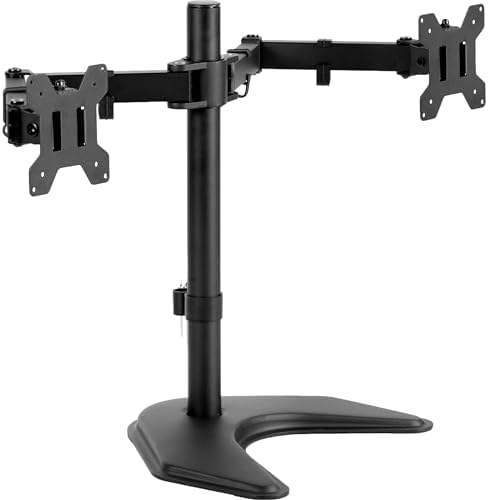
The VIVO STAND-V002FG leads this group, holding up to 22 lbs per screen across 13 to 32 inch screens on a freestanding glass base, while the HUANUO FlowLift suits 32-inch screens with a clamp mount. Every stand here holds two monitors, supports VESA 75x75mm or 100x100mm holes, and offers tilt, swivel, and 360-degree rotation, so the choice comes down to size, weight, and mount type.
The five stands split into two groups: two clamp or grommet mounts that lock to the desk edge, and three freestanding stands that rest on a base. Clamp mounts free the desktop under the screens, while freestanding stands move between desks. Read the size and weight limits first: a stand rated for 27-inch screens will not cover a 32-inch pair.
As an Amazon Associate, we earn from qualifying purchases.



Pick by Your Need
- Best overall: HUANUO FlowLift Dual Monitor Stand. It covers 13 to 32 inch screens at 4.4 to 19.8 lbs per arm, with a dual C-clamp and a grommet option.
- Best for beginners: MOUNT PRO Dual Monitor Stand. It arrives with labeled parts and clear instructions, and it rests on a freestanding V-shaped base.
- Best simple option: VIVO Freestanding Dual Monitor Mount. It needs no clamp or grommet work, and its detachable VESA plates simplify mounting.
- Best step-up: ErGear Dual Monitor Arm. It lifts screens up to 17.5 inches, extends up to 18.1 inches, and uses a tool-free VESA plate.
- Best for heavier screens: VIVO Glass Base Dual Monitor Stand. It holds up to 22 lbs per screen across 13 to 32 inch sizes.
Quick Answer
Choose the HUANUO FlowLift for 32-inch screens on a wooden desk with a free edge, since it clamps to desks 0.59 to 3.54 inches thick and holds 4.4 to 19.8 lbs per arm. Choose the VIVO STAND-V002F for heavier screens on a freestanding base, since it holds up to 22 lbs per screen for sizes from 13 to 27 inches. Choose the ErGear arm for the tallest lift at 17.5 inches and the longest reach at 18.1 inches.
Comparison Table
| Product | Screens | Weight per arm | VESA | Mount type | Trade-off | Buy |
|---|---|---|---|---|---|---|
| HUANUO FlowLift | 13–32 in | 4.4–19.8 lbs | 75×75 / 100×100 mm | Dual C-clamp or grommet | Wooden desks only, 0.59–3.54 in thick | View on Amazon |
| VIVO STAND-V002F | 13–27 in | Up to 22 lbs | 75×75 / 100×100 mm | Freestanding, 13 x 10.5 in base | No clamp option | |
| ErGear Dual Monitor Arm | 13–32 in | 4.84–19.8 lbs | 75×75 / 100×100 mm | C-clamp or grommet | Wooden desk recommended | View on Amazon |
| VIVO STAND-V002FG | 13–32 in | Up to 22 lbs | 75×75 / 100×100 mm | Freestanding, glass base 15.2 x 10.2 in | No clamp option | |
| MOUNT PRO Dual Monitor Stand | 13–27 in | Up to 17.6 lbs | 75×75 / 100×100 mm | Freestanding, V-shaped base | Lowest weight limit here | View on Amazon |
Decision Guide
Start with screen size. Three stands cover 13 to 32 inches: HUANUO FlowLift, ErGear arm, and VIVO STAND-V002FG. Two stop at 27 inches: the VIVO STAND-V002F and the MOUNT PRO. Screens of 28 inches or more leave only the three 32-inch stands.
Next, weigh each screen. The two VIVO stands hold up to 22 lbs per screen, the highest limit here. The HUANUO holds 4.4 to 19.8 lbs per arm, the ErGear 4.84 to 19.8 lbs, and the MOUNT PRO up to 17.6 lbs. A screen near 20 lbs rules out the MOUNT PRO, and a screen under 4.4 lbs falls below the HUANUO and ErGear minimums.
Then check the desk. The HUANUO fits wooden desks 0.59 to 3.54 inches thick with no cross beams under the edge. The ErGear fits desks 0.39 to 2.56 inches thick with its C-clamp, or 0.39 to 2.95 inches with its grommet mount, on a wooden desk with no crossbeam underneath. Freestanding bases need desk space: VIVO bases measure 13 x 10.5 and 15.2 x 10.2 inches; MOUNT PRO states no base size.
For movement, the ErGear lifts up to 17.5 inches and extends up to 18.1 inches, the longest reach. The HUANUO lifts up to 15.75 inches, while the MOUNT PRO tilts and swivels -90 to +90 degrees and reaches 17.6 inches high. Both VIVO stands tilt +90 to -90 degrees and rotate 360 degrees; the STAND-V002F swivels 180 degrees, the STAND-V002FG 360 degrees.
1. HUANUO FlowLift Dual Monitor Stand — Best overall
The HUANUO FlowLift is the only stand here with a dual C-clamp on a larger platform, plus a grommet option for the same desk range. It covers 13 to 32 inch screens at 4.4 to 19.8 lbs per arm. Its +85/-50 degree tilt is narrower than the ±90 degree tilt elsewhere.
| Spec | From the listing |
|---|---|
| Screen size | 13–32 inches |
| Weight per arm | 4.4 to 19.8 lbs |
| VESA | 75x75mm or 100x100mm |
| Desk thickness | 0.59–3.54 inches, wooden desks only |
2. VIVO Freestanding Dual Monitor Mount — Best simple option
The VIVO STAND-V002F has the smallest stated freestanding base at 13 x 10.5 inches, and the highest weight limit at up to 22 lbs per screen. Its 13 to 27 inch range is narrower than the 32-inch range on three rivals. Detachable VESA bracket plates and the included hardware and instructions cover mounting.
| Spec | From the listing |
|---|---|
| Screen size | 13–27 inches |
| Weight per screen | Up to 22 lbs |
| VESA | 75x75mm or 100x100mm |
| Base size | 13 x 10.5 inches |
3. ErGear Dual Monitor Arm — Best step-up
The ErGear arm posts the tallest lift and the longest reach here: height adjusts up to 17.5 inches and the arms extend up to 18.1 inches, ahead of the HUANUO lift of 15.75 inches. It covers 13 to 32 inch flat or curved monitors at 4.84 to 19.8 lbs, with VESA 75x75mm or 100x100mm, and its upgraded VESA plate allows tool-free installation. The one-piece C-clamp fits desks 0.39 to 2.56 inches thick, and the grommet mount fits 0.39 to 2.95 inches.
| Spec | From the listing |
|---|---|
| Screen size | 13–32 inches, flat or curved |
| Weight per arm | 4.84 to 19.8 lbs |
| VESA | 75x75mm or 100x100mm |
| Desk thickness, C-clamp | 0.39–2.56 inches |
4. VIVO Glass Base Dual Monitor Stand — Best for heavier screens
The VIVO STAND-V002FG combines the 13 to 32 inch screen range with the 22 lb per-screen limit, the only stand here with both the widest size range and the highest weight limit. Its tempered glass base measures 15.2 x 10.2 inches with bottom-side padding, and the pole and arms are steel. It tilts +90 to -90 degrees, swivels 360 degrees, and rotates 360 degrees, with height adjustment along the center pole.
| Spec | From the listing |
|---|---|
| Screen size | 13–32 inches |
| Weight per screen | Up to 22 lbs |
| VESA | 75x75mm or 100x100mm |
| Base size | 15.2 x 10.2 inches, tempered glass |
5. MOUNT PRO Dual Monitor Stand — Best for beginners
The MOUNT PRO stand matches the VIVO STAND-V002F on tilt and swivel range: -90 to +90 degree tilt, -90 to +90 degree swivel, and 360-degree rotation, with height adjustable up to 17.6 inches. Its V-shaped base includes a groove for a mobile phone, a detail none of the other four stands lists. It fits 13 to 27 inch monitors with VESA 75x75mm or 100x100mm holes, at up to 17.6 lbs per arm, the lowest limit.
| Spec | From the listing |
|---|---|
| Screen size | 13–27 inches |
| Weight per arm | Up to 17.6 lbs |
| VESA | 75x75mm or 100x100mm |
| Maximum height | 17.6 inches |
Buying Checklist
- Measure each screen diagonally and weigh it, then match both numbers against the size range and per-arm weight limit, including any minimum.
- Check the back of each monitor for VESA 75x75mm or 100x100mm holes before ordering.
- Measure desk thickness and check the underside for cross beams or panels before using a clamp or grommet mount.
- Measure desk space for a freestanding base: 13 x 10.5 or 15.2 x 10.2 inches; MOUNT PRO states no base size.
- Compare tilt, swivel, rotation, and lift figures for two or three finalists side by side, and check the return window on the product page.
FAQ
What screen sizes fit a dual monitor stand?
The HUANUO FlowLift, the ErGear arm, and the VIVO STAND-V002FG each cover 13 to 32 inch screens, while the VIVO STAND-V002F and the MOUNT PRO each cover 13 to 27 inch screens. Measure each screen diagonally and confirm the VESA pattern on the back before choosing.
Should I pick a clamp mount or a freestanding stand?
A clamp or grommet mount locks to the desk edge and leaves the desktop clear, but it needs a compatible desk thickness and material. A freestanding stand needs no desk hardware and moves between desks, but its base occupies desk space. Check the desk thickness range for clamp models and the base dimensions for freestanding models.
How much weight can each arm hold?
The two VIVO stands hold up to 22 lbs per screen, the highest limit here. The HUANUO FlowLift holds 4.4 to 19.8 lbs per arm, the ErGear arm holds 4.84 to 19.8 lbs, and the MOUNT PRO holds up to 17.6 lbs per arm. Weigh each screen and check the lower limit too.
Final Verdict
The HUANUO FlowLift is the pick for most two-screen desks with 32-inch monitors, thanks to its dual C-clamp and 0.59 to 3.54 inch desk range. The VIVO STAND-V002FG is the pick for heavy 32-inch screens on a freestanding base, and the STAND-V002F for heavy screens up to 27 inches with the smallest base. The ErGear arm suits desks where the tallest lift and longest reach matter, and the MOUNT PRO suits matched pairs up to 27 inches.
Prime covers fast, free delivery on eligible items. See whether a Prime free trial is available for your account.
Check Prime on Amazon →Types of Computer Monitors
Monitors outside gaming-specific models are grouped mainly by resolution and by shape. 1080p and 1440p monitors cover most general and productivity use. 4K monitors show more detail but need more GPU power to drive at full resolution. Portable monitors add a second screen for a laptop without a permanent desk setup.
A dual-monitor stand or mount lets two screens be positioned consistently at the same height and distance, which matters for reducing neck strain compared to two separate, mismatched stands at different heights.
Frequently Asked Questions
What resolution is a reasonable default for general desk use?
1440p is a common middle ground, offering more detail than 1080p without the GPU demands or price premium of a 4K panel at typical desk viewing distances.
Does a portable monitor need its own power source?
Many draw power directly from the connected laptop over USB-C, though some higher-brightness portable monitors need a separate power adapter for full performance.
Related Guides
 Best 240Hz Monitor OLED Options for Smooth Gaming PlayCompare five 240Hz OLED monitors in 32, 31.5, 34.2 and 27 inch sizes, with…Read next →
 Best RTX Graphics Cards: 5060 Ti, 5060 and 5080 PicksCompare five RTX graphics cards on memory, bus width, boost clocks and card size,…Read next →
 Best Gaming Monitor With NVIDIA G-Sync: 5 Picks ComparedFive gaming monitors that state NVIDIA G-Sync compared on size, resolution, refresh rate, response…Read next →


Write Your Review
No reviews yet. Be the first to share your experience!